The Chip on Your Desk
A little while ago I bought one of those twelve-dollar development boards that show up at the top of every “get started with microcontrollers” video. It arrived in an anti-static bag with two USB-C ports and a pin header on each long edge, and the moment I plugged it into my laptop it did something unprompted: a tiny light near one corner began cycling through red, then green, then blue, one second each, forever. Nobody told it to. There was no app, no flashing step, no code I had written. The board shipped already running a program, and that program was written in Python.
That is a strange sentence if you sit with it. Python, the language I reach for when I want to script something in an afternoon, was running on a chip smaller than a postage stamp, with no operating system in the usual sense, driving a light with no screen and no keyboard attached. How? What is actually executing those red, green, blue instructions when there is no Windows or macOS or Linux underneath? And once I understood that, a second question followed naturally: if I were going to write that program myself, is Python really the right tool for a chip this small, or would something like Rust fit the hardware better?
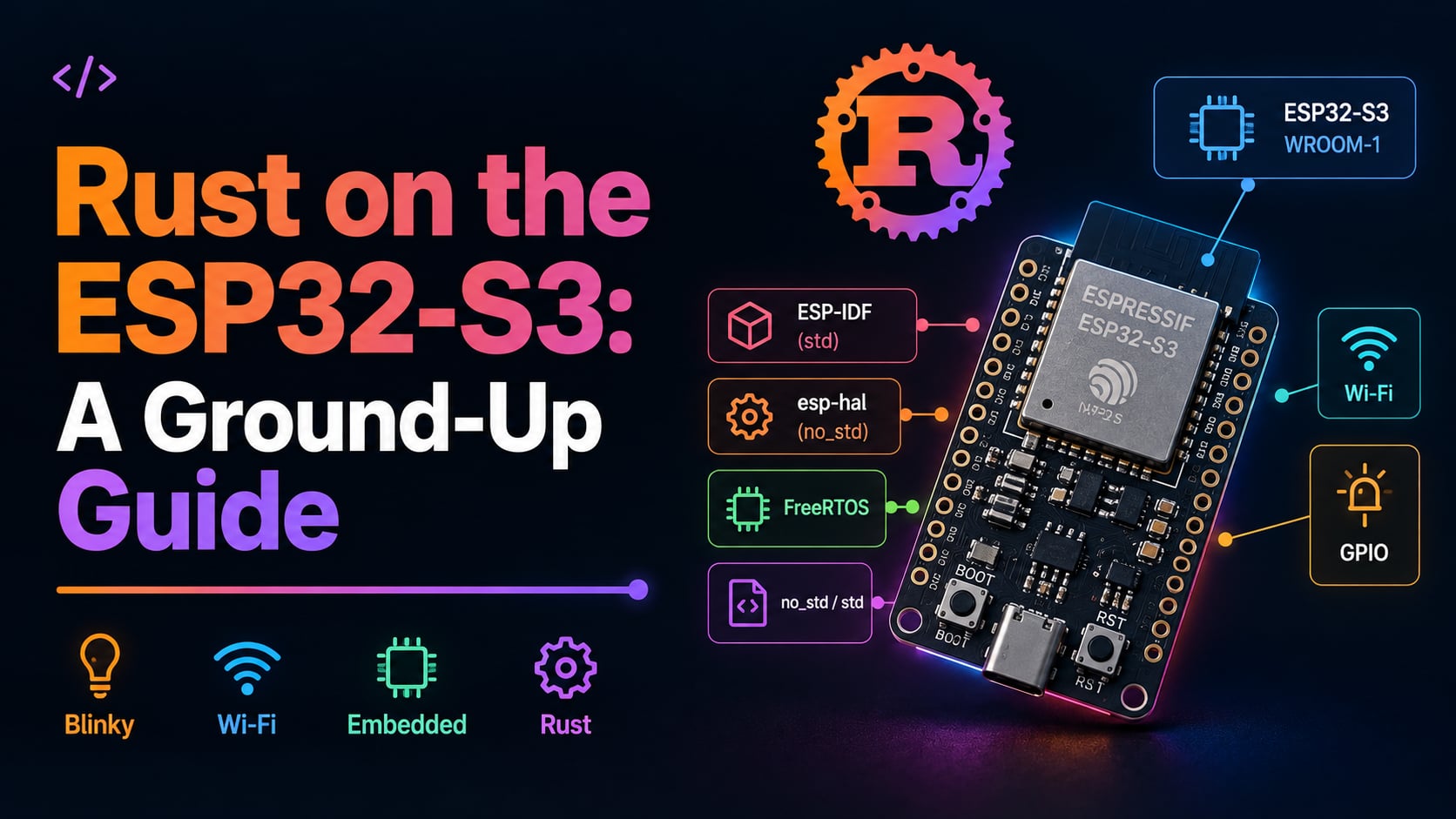
This article is the long answer to both questions. We are going to start from the silicon and work all the way up to three working programs flashed onto a real board. We will cover what the ESP32 actually is and who makes it, the difference between the chip, the module, and the dev board (three words people use interchangeably and should not), how a program boots and runs on hardware with no operating system, and the vocabulary of the software stack: ESP-IDF, FreeRTOS, the HAL, and the no_std versus std split. Then we make the honest case for Rust over Python on this class of hardware, with a fair word about C. After that it is hands-on: installing the toolchain on an Apple laptop, writing the same blinking-LED program two completely different ways, and finally connecting to Wi-Fi and parsing a JSON response from a real HTTPS API.
What we are not covering: anything about machine learning or training (the “AI” instructions this chip has are a hardware detail we will mention once and leave alone), Bluetooth Low Energy, deep-sleep and power optimization in any depth, the internals of the real-time operating system beyond what a task is, and production over-the-air firmware updates. Those are large topics, and I will link the official documentation where they come up. Everything here was done on an Apple M2 MacBook against one specific board: a GERUI ESP32-S3-WROOM-1 N16R8, the cheap dev board from the opening, and every log line and binary size you will see was captured from that exact hardware.
If you would rather start with the code than the explanation, you do not have to wait until the end. All three programs we build are public and runnable right now: the companion source lives in the runtimepanic-projects repository, under projects/esp32-intro, as three separate crates (blinky-no_std, blinky-std, and wifi-json-std). Clone it, flash a demo, and come back for the why. Everything here was flashed and verified on real hardware, so what is in the repo is exactly what produced the log lines and binary sizes you will see.
Let’s start with the thing in the middle of all of it: the chip.
What the ESP32 Actually Is
Before we write a line of code, it helps to know what we are writing code for, and where it came from. Why is this one chip cheap, wireless, and seemingly everywhere at once? The ESP32 did not appear in a vacuum, and understanding its lineage explains why it is cheap, why it has Wi-Fi built in, and why half the hobbyist internet runs on it.
Espressif and the lineage
The ESP32 family is made by Espressif Systems, a fabless semiconductor company headquartered in Shanghai. “Fabless” means they design the chips but do not own the factory that etches the silicon; they hand the design to a foundry (in Espressif’s case, largely TSMC) that does the physical manufacturing. Think of it like a restaurant that writes the recipes and plates the dishes but rents a shared industrial kitchen to actually cook in: the creative work and the branding are theirs, the ovens are someone else’s.
Espressif’s first breakout product was the ESP8266, released in 2014. It was a tiny, almost absurdly cheap chip with Wi-Fi built in, and it landed at a moment when every maker suddenly wanted to put their project on the internet. Before it, adding Wi-Fi to a hobby project meant bolting an expensive add-on board onto an Arduino. The ESP8266 put the radio and a processor on one cheap part, and it took over.
The ESP32 followed in 2016 as the grown-up successor: more memory, a faster dual-core processor, and Bluetooth alongside the Wi-Fi. It became the default chip for an enormous range of connected devices, both the weekend-project kind and the shipping-commercial-product kind. Why did it win so completely? Two reasons, mostly. It is cheap enough to design into a product that sells for a few dollars, and it integrates the two wireless radios most IoT devices need (Wi-Fi and Bluetooth) directly onto the chip, so you do not pay for or wire up separate parts. Cheap plus wireless plus “good enough” compute is a hard combination to beat.
Chip, module, dev board
Here is the single most useful distinction in this entire article, and the one that trips up every newcomer. The words “ESP32”, “WROOM”, and “dev board” refer to three different physical things nested inside each other, and people say them interchangeably as if they were synonyms. They are not.
The chip is the bare silicon: the actual integrated circuit, a black square a few millimeters on a side with the processor, memory, and radios fabricated into it. Our chip is the ESP32-S3. On its own it is almost unusable by a hobbyist. It needs supporting components, a precise clock crystal, an antenna, and a certain amount of flash memory before it does anything, and it is physically too small to solder by hand. A clock crystal is a tiny component that vibrates at a fixed, precise frequency, and the chip uses that steady beat as a metronome to pace everything it does.
The module is the next layer out. It is the chip plus the parts it needs, all mounted on a small circuit board and sealed under a metal can with a printed antenna on one end. Our module is the ESP32-S3-WROOM-1. That metal shield does three jobs: it adds the flash memory (and sometimes extra RAM) the chip needs, it provides a tuned antenna, and critically it carries regulatory certification (FCC in the US, CE in Europe) so that a company can drop the module into a product without re-certifying the radio themselves. The module is what manufacturers actually buy by the reel and solder into real products.
The dev board is the outermost layer, and it is what arrived in my anti-static bag. It is the module soldered onto a larger, friendlier circuit board that adds the things a human needs to work with it: USB ports for power and programming, a voltage regulator, a couple of buttons, and pin headers broken out along the edges so you can plug in jumper wires. The dev board exists purely so that you, a person with a laptop and no soldering station, can start writing code in five minutes.
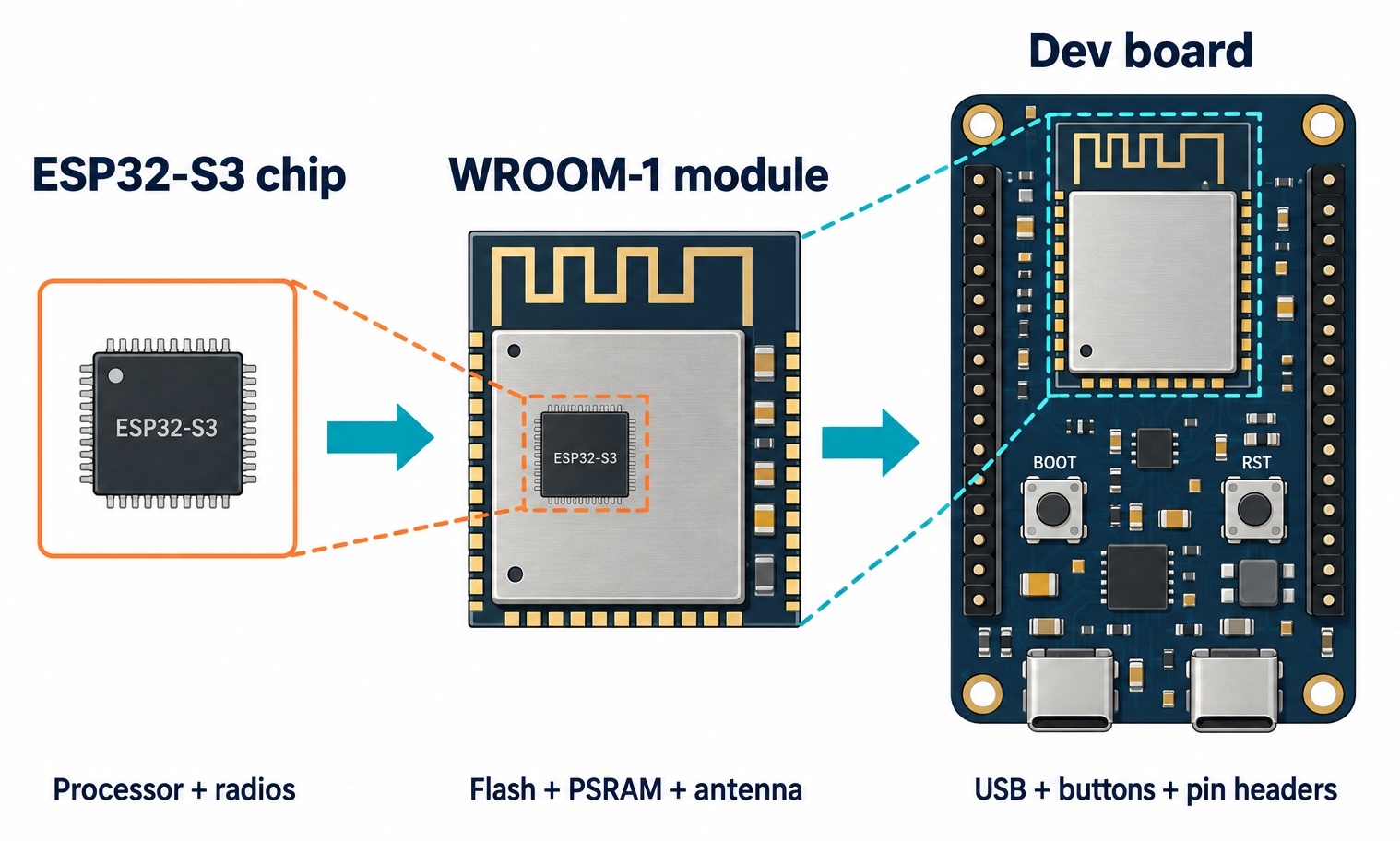
💡 Think of it like an engine, a crate motor, and a car. The chip is the raw engine block, the useful core but not something you can drive. The module is the crate motor: the engine plus all the ancillaries, sealed and certified, ready to be dropped into a vehicle. The dev board is the finished car with a steering wheel, pedals, and a seat, built so a human can actually operate the thing. When someone says “I’m using an ESP32”, they almost always mean the dev board, which contains a module, which contains the chip.
This Chip and Its Siblings
Now that we can name the layers, let’s zoom in on the chip at the center of ours and see where it sits in the family. Why does the specific variant matter? Because the exact chip you have determines which Rust toolchain you need, and getting that wrong is the number-one way a beginner’s first build fails.
What the ESP32-S3 is
The ESP32-S3 is a dual-core microcontroller running at up to 240 MHz. Its two processor cores are a design called Xtensa LX7, a 32-bit architecture licensed from a company called Cadence (originally Tensilica). Hold onto that word Xtensa; it is going to matter enormously when we get to Rust. The S3 has Wi-Fi (the 802.11 b/g/n generation, often called Wi-Fi 4) and Bluetooth 5 Low Energy, a generous pile of general-purpose input/output pins, and a native USB controller built directly into the chip. It also carries a set of vector instructions that Espressif markets for lightweight on-device machine learning, which is the “AI acceleration” you will see mentioned in datasheets and which we are not going to touch again.
Our specific board also reports its details when you probe it, and because we captured those from the real hardware they are worth stating concretely. The chip is an ESP32-S3 in a QFN56 package at silicon revision v0.2, with a factory-assigned Wi-Fi MAC address of b8:1f:3f:db:18:f0, clocked by a 40 MHz crystal. These are not numbers you need to memorize; they are the kind of identity a tool prints when it first talks to the board, and seeing them is how you confirm you are talking to the chip you think you are.
The family tree
The ESP32 is not one chip but a growing family, and the members split along one architectural line that decides everything about tooling. Here is the shape of it:
- The original ESP32 (2016) uses two Xtensa LX6 cores. It is the workhorse, still everywhere, no native USB.
- The ESP32-S2 is a single Xtensa core with native USB but no Bluetooth, a cost-reduced middle child.
- The ESP32-S3 (ours) is dual Xtensa LX7 with native USB, Bluetooth LE, and the vector instructions, the current flagship of the Xtensa line.
- The ESP32-C3, C6, and H2 are a completely different branch: they use RISC-V cores instead of Xtensa.
That last bullet is the fork in the road. The older and flagship chips (the original ESP32, S2, and S3) are built on Xtensa, a proprietary instruction set architecture. The newer C and H chips are built on RISC-V, an open, royalty-free instruction set that the whole industry is converging on. An instruction set architecture is simply the vocabulary of machine instructions a processor understands: the specific binary opcodes for “add these two numbers”, “load this from memory”, “jump here”. Code compiled for one architecture is meaningless to the other, the way a book printed in the Latin alphabet is unreadable to someone who only knows Cyrillic, even if the underlying language were somehow the same.
Why does an open versus proprietary instruction set matter to us, writing Rust? Because the tools that turn Rust into machine code have to know the target’s vocabulary. RISC-V is supported out of the box by the standard, upstream Rust compiler. Xtensa is not, because it is proprietary and comparatively niche, so somebody has to maintain special compiler support for it. We will see exactly what that costs us in a later section. For now, just lodge the fact: our S3 is an Xtensa chip, and Xtensa is the harder road for Rust tooling.
Anatomy of This Board
Theory is easier to absorb when you can point at the thing. So let’s take a slow walk around the actual GERUI ESP32-S3-WROOM-1 N16R8 board from the opening and name every part that matters, because each one explains a decision we make later. Ever picked up a dev board and had no idea what half the markings meant? By the end of this section you will.
Reading the name: N16R8
The suffix on the module name, N16R8, is not random. It encodes the two memory sizes baked into the module, and memory is the whole game on a device this small.
The N16 means 16 MB of flash memory connected over a quad SPI bus. The R8 means 8 MB of PSRAM connected over a faster octal SPI bus. A bus is just the set of wires that carry data between two chips, and SPI (Serial Peripheral Interface) is a common, simple bus standard for wiring a processor to its memory. The difference between quad and octal is simply how many of those data lines the bus uses in parallel: quad uses four, octal uses eight, so the octal bus shuttles roughly twice as many bits per clock tick. PSRAM gets the wider, faster bus because it is working memory where sustained throughput matters, while flash is perfectly content on the narrower quad bus because, thanks to the instruction cache we will meet shortly, most instruction fetches never reach flash at all. To understand why the chip needs both of those plus a third kind of memory, we have to be clear on what each one is, because they are not interchangeable.
Flash is non-volatile storage: it keeps its contents when the power is off. This is where your program lives. When you “flash the board”, you are writing your compiled firmware into this 16 MB chip, and it stays there across reboots and unplugging, the way files stay on an SSD. It is relatively slow to access and you cannot execute code from it as freely as from RAM, which becomes important when we discuss how the chip actually runs code.
SRAM (static RAM) is the chip’s fast, built-in working memory, and the ESP32-S3 has roughly 512 KB of it on the silicon itself. This is volatile: it is wiped on every reset. It holds your program’s variables, its stack, and the data it is actively churning on. It is fast, and there is not much of it, and that scarcity is a recurring character in this story.
PSRAM (pseudo-static RAM) is additional RAM, the 8 MB in our R8, that lives in the module but outside the processor’s own silicon, connected over that octal SPI bus. It is more plentiful than the on-chip SRAM but slower to reach, because every access travels over a serial bus rather than sitting right next to the cores. It exists to give you breathing room when 512 KB of SRAM is not enough, for example when a Python interpreter and its heap need megabytes rather than kilobytes.
Our probe of the real board confirmed the flash is a 3.3 V quad SPI part reporting manufacturer ID 0x1c and device ID 0x7118, with the 8 MB octal PSRAM embedded in the module exactly as the R8 promises.
💡 Why does a chip need three different memories instead of one big one? Speed, cost, and persistence pull in different directions, and no single memory technology is good at all three at once. Fast on-chip SRAM is expensive per byte, so you get little of it. Flash is cheap and permanent but slow and awkward to execute from. PSRAM splits the difference on capacity but pays for it in access speed. The chip uses each where its strength fits: flash to store the program, SRAM for the hot working set, PSRAM for bulk overflow.
Two USB-C ports, and why
The board has two USB-C connectors side by side, and the first time you see that you wonder which one to plug into. The answer is “it depends on what you want”, because they are wired to two different things.
One port goes to a separate little chip on the board, a USB-to-UART bridge (a CP2102 or CH340-class part, depending on the board revision). UART is an old, simple serial protocol: two wires, one transmitting and one receiving, sending bytes one bit at a time. The ESP32 speaks UART natively on a pair of its pins, but your laptop does not have a UART port, it has USB. The bridge chip is a translator sitting in the middle, presenting itself to your Mac as a serial port while talking UART to the ESP32 on the other side.
The other port goes straight to the chip’s own native USB-Serial-JTAG controller, the USB hardware built directly into the ESP32-S3 silicon. No translator chip in between. This port can act as a serial console and also as a JTAG debugging interface, which is a hardware channel for stepping through code and inspecting the chip’s state. Because it is part of the chip itself, it can do a trick the UART bridge cannot: it can reset the chip into programming mode on its own, which is why on an S3 you rarely have to touch the board’s buttons to flash it. For everything in this article we use this native USB port.
💡 A real gotcha lives here. On the factory MicroPython firmware our board shipped with, the interactive Python prompt was wired to the old UART pins (UART0), not the native USB port. That meant tools talking to the native USB port could not reach the Python REPL (the interactive prompt where you type code and it runs immediately) at all. The lesson is that “it has USB” does not guarantee every piece of firmware routes its console to that USB; always check which serial interface a given firmware actually uses.
The only LED is a smart one
Here is a surprise that shapes both blinky demos later. This board has no plain, dumb LED you can switch on by driving a pin high. The single onboard user LED is an addressable WS2812 (the type sold under the brand name NeoPixel) wired to GPIO48.
An addressable LED is a very different animal from a regular one. A regular LED has two legs; you put voltage across them and it lights up, and brightness is all you control. A WS2812 is a tiny LED package with a microscopic controller chip built into it, driven by a single data wire. Along that one wire you send a precisely-timed stream of pulses encoding 24 bits: eight for red, eight for green, eight for blue. The built-in controller reads those 24 bits, latches the color, and lights its three internal elements to match. Chain several in a row and each one grabs its own 24 bits and passes the rest down the line, like a bucket brigade where the first person keeps one bucket and hands everything behind it to the next, which is how a strip of hundreds of them runs off a single pin.
The catch, and the reason both our blinky programs look more involved than “turn pin on”, is the word “precisely-timed”. A WS2812 reads a bit as high or low based on how long the pulse stays high, down to fractions of a microsecond, at a bit rate around 800 kHz. Get the timing wrong and the LED sees garbage. You cannot comfortably produce pulses that sharp by toggling a pin in a loop and hoping, so the chip has dedicated hardware for it, which we meet in the hands-on sections.
The two buttons: BOOT and RST
Finally, the two little buttons, usually labeled BOOT and RST (reset). RST is the simple one: pressing it reboots the chip, the same as cycling the power. BOOT is where the interesting concept lives.
BOOT is connected to GPIO0, which is a strapping pin. A strapping pin is a regular GPIO pin that does double duty: at the exact instant the chip comes out of reset, before any of your code runs, the chip reads the voltage level on that pin and uses it to decide how to start up. After that boot moment the pin goes back to being an ordinary GPIO you can use for anything. It is like the ignition position on a car key: in the first fraction of a second it chooses “start the engine normally” versus “just power the accessories”, and after that the key just sits there.
The decision GPIO0 controls is whether the chip runs your program normally or drops into download mode, a built-in serial bootloader frozen into the chip’s read-only memory whose entire job is to receive new firmware over the serial port and write it to flash. If GPIO0 is held low (grounded) at reset, the chip enters download mode and waits to be programmed. If it is high (the default), the chip boots your firmware normally. So the manual recipe to force a stubborn board into programming mode is: hold BOOT down (pulling GPIO0 low), tap RST (triggering a reset while GPIO0 is low), then release BOOT. The chip resets, reads GPIO0 low, and sits in download mode.
Here is the happy part for the S3 specifically. Because the native USB-Serial-JTAG controller is baked into the chip, the flashing tool can ask the chip to reset itself into download mode over USB, with no button-pressing from you. So on this board the BOOT-and-RST dance is a fallback for when something is wedged, not a routine step. You will mostly flash it by just running one command, which we will do shortly.
How a Program Runs Here
This is the conceptual heart of the whole article, so we are going to take it slowly. If you come from writing software for laptops, phones, or servers, you carry a huge pile of assumptions about what happens when a program runs, and almost none of them hold on a bare microcontroller. What actually executes your code when there is no operating system to launch it?
There is no operating system (by default)
On your laptop, your program is a file. You double-click it or type its name, and an operating system (macOS, Linux, Windows) finds that file, loads it into memory, hands it a slice of CPU time, gives it a virtual view of memory so it thinks it has the whole machine to itself, and juggles it alongside hundreds of other programs. The operating system is a permanent landlord, and your program is one of many tenants it manages.
On the ESP32-S3, by default, there is no landlord. There is no macOS or Linux sitting underneath waiting to launch things. Instead, your compiled program is the system. It is the only software of its kind on the chip, it owns all the memory and all the peripherals directly, and when the chip powers on, your code (after a short handoff we are about to trace) simply starts running and never stops. This is what people mean by bare metal: software running directly on the hardware with no operating system layer between them.
It helps to pin down three words that get muddled. Firmware is the catch-all term for software that is permanently stored in a device and runs it; it lives in flash and it is the thing you flash onto the board. An operating system is a specific kind of software whose job is to manage hardware resources and run other programs on top of it; it is the landlord. “Bare metal” describes the arrangement where firmware runs with no operating system beneath it. On our board, the Rust programs we write are firmware that runs bare metal (in one of our two tracks) or firmware that runs on a very small operating system we bundle in (in the other). More on that split soon.
The boot sequence, step by step
So if there is no operating system to launch your program, what does? When the ESP32-S3 comes out of reset, a precise relay race begins, and tracing it demystifies the whole machine. Here is what actually happens, in order.
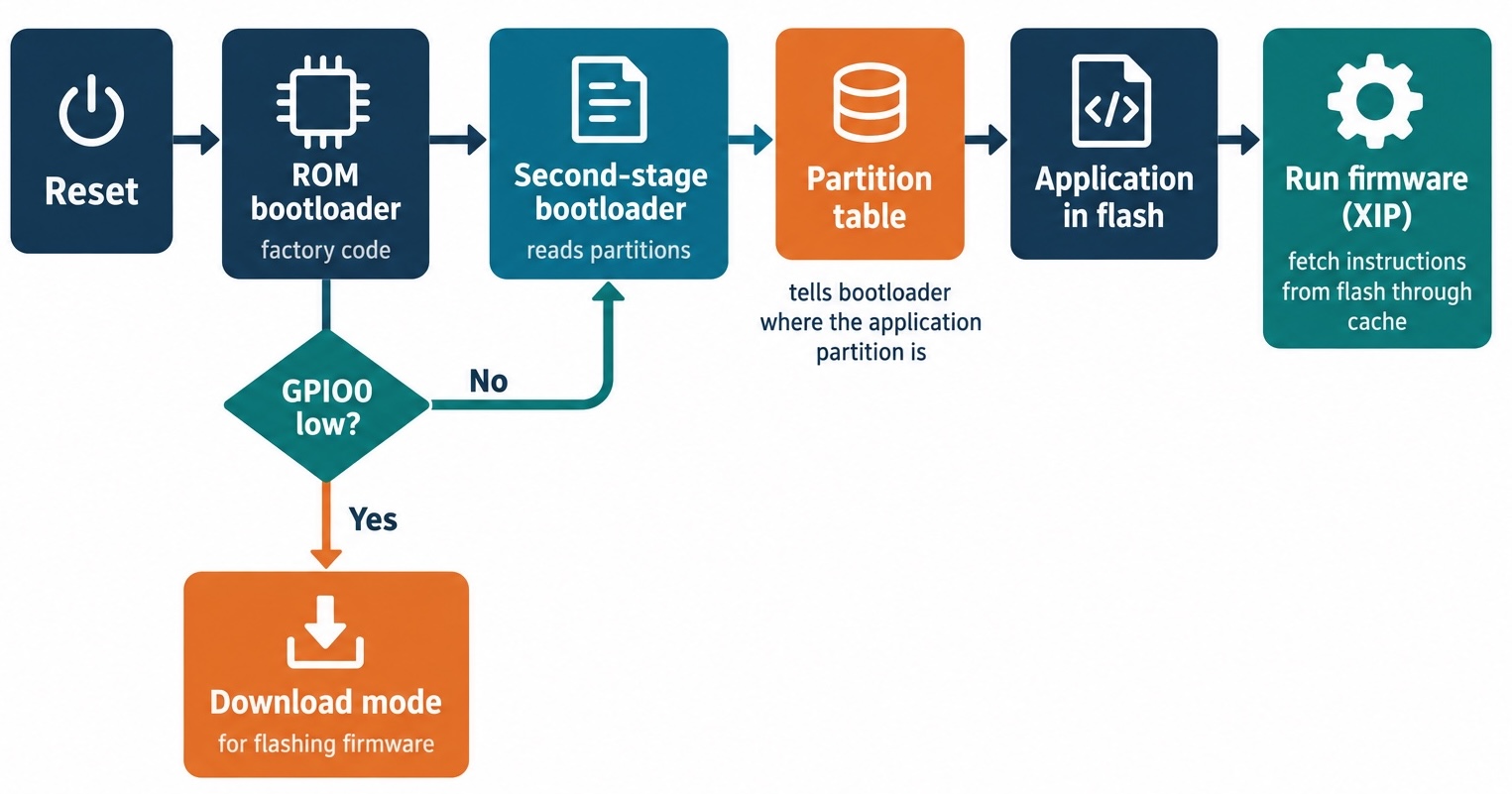
First, the chip starts executing a tiny first-stage bootloader that is burned into read-only memory inside the silicon at the factory and can never be changed. The processor’s reset vector, the fixed address it always jumps to on reset, points here. This ROM code is minimal: its job is just to figure out where to go next, and (remember the strapping pin) to check GPIO0 to decide whether to divert into download mode instead.
Second, assuming normal boot, that ROM bootloader loads a second-stage bootloader from the very start of flash (address 0x0) into RAM and jumps to it. This second-stage bootloader is part of the firmware you flash, and it is more capable. Its main task is to read the partition table.
Third, the partition table. Flash is not one undifferentiated blob; it is carved into labeled regions called partitions, and the map of those regions is the partition table, which lives at a fixed, agreed-upon address: 0x8000. The second-stage bootloader reads this map to find out where everything is. On our board, probed from the real hardware, that table looks like this:
Name       Type   Subtype   Offset     Size
nvs        data   nvs       0x9000     24 KB
phy_init   data   phy       0xf000     4 KB
factory    app    factory   0x10000    1984 KB
vfs        data   fat       0x200000   6144 KB
In the example above, each row is a region with a name, a purpose, a start address (offset) in flash, and a size. The nvs partition is non-volatile storage, a small key-value store the system uses to persist little pieces of configuration and (as we will see with Wi-Fi) radio calibration data across reboots. The phy_init partition holds physical-layer radio tuning data. The factory partition of type app at offset 0x10000 is the important one: it is the actual application firmware, the program the chip will run, and app is the partition type the bootloader hunts for. The vfs partition is a 6 MB filesystem region; on our board the factory MicroPython build formatted it as a LittleFS filesystem and stored its main.py there. The bootloader reads this table, finds the app partition, and knows where the program it must launch lives.
Fourth, the bootloader jumps to the application in that app partition, and your firmware is now running. On the ESP32, application code does not get fully copied into RAM first; there is not nearly enough RAM for that. Instead it uses execute-in-place (XIP): the processor fetches instructions directly from flash as it needs them, through a hardware cache that keeps recently-used chunks in fast memory. Picture it like reading a long reference book you keep on a shelf across the room: you do not photocopy the whole book onto your desk, you walk over and fetch the page you need, and you keep the handful of pages you are using right now on the desk (the cache) so you are not constantly walking back. The data your program works on does live in the fast SRAM we discussed, but the instructions stream from flash through the cache.
There is a subtle cost hiding in that cache, and because determinism is a big part of our Rust sales pitch it would be dishonest to skip it. Fetching an instruction that is already in the cache (a cache hit) is fast, but when the code jumps to a chunk that is not cached yet (a cache miss), the processor has to go fetch it from slow flash, which takes noticeably longer, and you cannot predict exactly when a miss will happen. For the millisecond-scale delays in this article that jitter is completely irrelevant. For genuinely hard real-time work measured in fractions of a microsecond, though, it means even compiled Rust running from flash is not perfectly deterministic. The usual fix is to place the timing-critical code and data in on-chip RAM (called IRAM) so it never pays a cache miss, which is why serious real-time firmware marks those hot functions with an IRAM-placement attribute to pin them there.
That is the whole relay: reset vector to ROM bootloader to second-stage bootloader to partition table to your app, with the strapping pin able to divert the very first handoff into download mode. Everything mysterious about “how does it even start” is just those handoffs.
Where the ESP32 sits: a tale of three machines
The clearest way to feel what the ESP32 is, is to put it between two things you may already know. Think of three tiers of machine.
At the top, a laptop or a Raspberry Pi runs a full operating system, Linux or macOS or Windows. It has a memory management unit that gives every process its own private virtual address space, gigabytes of RAM, a filesystem, and a scheduler juggling hundreds of processes. Your program is a guest, one of many, and the operating system can start it, pause it, and kill it at will. You are far from the hardware, and that distance buys you enormous convenience.
At the bottom, a classic Arduino (the original AVR-based kind) is even barer than the ESP32: an 8-bit processor running at 16 MHz with a couple of kilobytes of RAM. There is no question of an operating system; there is barely room for your program. You are pressed right up against the metal, counting individual bytes.
The ESP32-S3 sits in the middle, and that middle position is exactly what makes it interesting. It is far more powerful than an Arduino: a 32-bit dual-core processor at 240 MHz with hundreds of kilobytes of RAM and megabytes of flash, plenty to run a real network stack and even a small operating system if you want one. But it is nowhere near a Raspberry Pi: no memory management unit giving processes private address spaces, no multi-user filesystem, no expectation that an operating system is managing everything. It can run bare metal like the Arduino, or it can run a lightweight operating system like the Pi, and that very choice is the two Rust tracks this article builds toward. Remember the BOOT and RST story from the hardware tour? The reset vector we just traced is precisely what RST triggers and what BOOT diverts, so the buttons and the boot sequence are two views of the same mechanism.
The Software Stack Vocabulary
Every ESP32 tutorial throws around a handful of acronyms as if everyone already knows them: ESP-IDF, FreeRTOS, HAL, no_std. If those words are fog to you, this section is the one that clears it, because the entire Rust story is built on top of these pieces and you cannot evaluate the choices without knowing what they are. Why learn the vocabulary before the code? Because every decision later (“std or no_std?”, “do I need ESP-IDF?”) is really a decision about which of these layers you pull in.
ESP-IDF
ESP-IDF stands for Espressif IoT Development Framework. It is Espressif’s official software development kit for their chips, written in C (with some C++), and it is the canonical, blessed way to build firmware for the ESP32 family. It is not just a library; it is a whole build system, a bundled version of the compiler, a configuration tool, and a large collection of components: drivers for every peripheral (each a dedicated hardware block inside the chip that does one job, like the GPIO pins, a timer, or the Wi-Fi radio), a Wi-Fi stack, a TCP/IP networking stack, a TLS (Transport Layer Security) library, filesystem support, and much more.
Why does it exist? Because writing firmware for a chip this complex entirely from scratch, poking raw hardware registers for every peripheral and implementing Wi-Fi from the specification, would be a multi-year project before you blinked a single LED. ESP-IDF is Espressif saying “here is everything, tested and integrated, so you can build a product”. When we take our std Rust track later, ESP-IDF is quietly doing the heavy lifting underneath, and the first build is slow precisely because it is compiling this entire C framework.
FreeRTOS
Bundled inside ESP-IDF is FreeRTOS, and it is the “small operating system” we keep alluding to. The RTOS part stands for real-time operating system. It is tiny compared to Linux, small enough to run in a few kilobytes, and it provides exactly one core service that a bare-metal program lacks: the ability to run several independent streams of code that appear to execute at the same time.
The unit of concurrency in FreeRTOS is a task. A task is an independent function with its own stack that the operating system can run, pause, and resume. You might have one task reading a sensor, another blinking an LED, and another handling network requests. The piece that makes them appear simultaneous is the scheduler: a small chunk of FreeRTOS code that, many times a second, decides which task gets the processor next and switches between them so fast that each seems continuous. Each task has a priority, a number telling the scheduler how important it is, so a time-critical task can preempt a lazy background one. Picture a chef in a kitchen with several dishes going: one chef cannot literally cook all of them at the same instant, but by rapidly switching between stations according to which dish needs attention most urgently (priorities), every dish progresses and dinner comes out on time. The S3 actually has two of these chefs, its two cores, and FreeRTOS can run a task on each, but the rapid-switching trick is what lets a single core juggle far more tasks than it has cores.
Why is this not a “full operating system” like Linux? Because it deliberately leaves out almost everything Linux does. No memory protection between tasks (a misbehaving task can corrupt another’s memory, since there is no memory management unit enforcing walls). No users, no processes in the Linux sense, no filesystem by default, no ability to load and run new programs at runtime. It is a scheduler and some synchronization primitives, and that minimalism is the point: it provides just enough operating system to juggle tasks on a microcontroller, and no more.
The HAL
HAL stands for hardware abstraction layer, and it is the layer that keeps you sane. At the lowest level, controlling a peripheral means writing specific bit patterns to specific memory addresses called hardware registers. Turning on an output pin might literally mean “set bit 3 of the 32-bit register at address 0x60004004”. That works, but it is unreadable, unportable, and terrifyingly easy to get wrong.
A hardware abstraction layer wraps those raw register pokes in named functions and types. Instead of “set bit 3 of register 0x60004004”, you write pin.set_high(). It is the steering wheel of the chip: you turn a wheel and the car changes direction, without you needing to know about the rack, pinion, and linkage doing the actual work underneath. The HAL knows which register and which bit that corresponds to for this specific chip, and it hides that detail behind a readable name. Why does it exist? Partly readability, but mostly correctness and portability: the HAL encodes the chip’s rules so you cannot easily violate them, and code written against a HAL can move to a different chip by swapping the HAL rather than rewriting every register access. In Rust, both of our tracks are built around a HAL, and a lot of Rust’s safety advantage shows up right here, as we will see.
Bare metal and no_std
We defined bare metal already as firmware with no operating system beneath it. In the Rust world this connects to a specific technical term: no_std. Normally a Rust program links against the standard library, std, which assumes a host operating system is present: it assumes there is a heap to allocate from, threads the OS can schedule, a filesystem, networking sockets, and so on. On bare metal none of that is guaranteed to exist, so you cannot use the full standard library.
A no_std program opts out of the standard library and uses only core, the subset of Rust that needs no operating system: the language fundamentals, basic types, and so on, but nothing that assumes a heap or an OS. If you want dynamic memory (a heap) in a no_std program, you bring your own allocator explicitly. This is the leanest possible way to run, pressed right against the hardware. One of our two Rust tracks is no_std, running bare metal with no operating system at all. The other uses std, which, surprisingly, is possible on this chip precisely because FreeRTOS and ESP-IDF can stand in for the operating system that std expects. That trick is the subject of a later section.
Where MicroPython fits
So where does the Python from the opening fit into all this vocabulary? MicroPython (and its cousin CircuitPython) is a small implementation of Python designed for microcontrollers. And here is the thing that surprises people: it is not magic, it is just an ESP-IDF application. MicroPython is a Python interpreter written in C, compiled as a regular ESP-IDF app, running as a FreeRTOS task. When the board boots, the bootloader launches the MicroPython firmware exactly like any other app, the interpreter starts up as a task, it mounts a filesystem in a flash partition, finds a file called main.py, and interprets it line by line.
That is literally what shipped on our board. Remember the partition table had a vfs filesystem partition? The factory firmware was MicroPython v1.19.1, and in that filesystem was a main.py that drove NeoPixel(Pin(48), 1) and cycled it red, green, blue, one second each. The mysterious self-starting light show from the opening was a Python script, interpreted at runtime by a C program running as a task on a small operating system on a bare chip. Every layer we just named was involved. Which raises the question the rest of the article answers: if we are going to write that program ourselves, is interpreting Python at runtime really the right approach on hardware this constrained?
Why Rust, Not Python
Now we can have the honest conversation. Python running on this board genuinely works, and the demo on our board proves it. So why would anyone reach for Rust instead? The answer is not “Rust is cooler”. It is a set of concrete tradeoffs rooted in how each language actually executes on hardware this small. Let’s be fair to Python first, because it deserves it, and then make Rust’s case without the usual exaggeration.
The honest case against Python here
Python’s difficulties on a microcontroller all trace back to one fact: it is interpreted. The code you write is not turned into native machine instructions ahead of time. It is compiled to an intermediate bytecode, and at runtime an interpreter (a C program, as we just saw) reads that bytecode and performs the corresponding actions. That indirection has costs that barely register on a laptop but bite hard on a chip with 512 KB of RAM.
The first cost is CPU work per line. Every time through your loop, the interpreter is doing extra work to decode and dispatch each bytecode instruction, work that compiled code simply does not do. On a 240 MHz chip this is often fine, but it is pure overhead, paid on every iteration and on every boot as the interpreter starts up.
The second cost is garbage collection. Python manages memory for you with a garbage collector, a mechanism that periodically scans for objects no longer in use and frees them. Picture a tidy-minded janitor who sweeps the office at moments of their own choosing: the room stays clean without you lifting a finger, but every so often everyone has to stop and stand still while the sweeping happens. The convenience is real, but the timing is not under your control: the collector runs when it decides to, and while it runs your program pauses. On a laptop a pause of a few milliseconds is invisible. On a device trying to generate pulses accurate to a fraction of a microsecond (like driving that WS2812), a nondeterministic pause at the wrong moment is a glitch you cannot prevent. On real-time hardware that concern stops being theoretical.
The third cost is RAM pressure. The interpreter itself, plus its bytecode, plus the heap of Python objects, all have to fit in memory. With only about 512 KB of fast SRAM, that is tight, and heavy use leads to fragmentation, where free memory exists but is chopped into pieces too small to satisfy an allocation. The PSRAM on our R8 board softens this considerably, which is exactly why a board with extra RAM is a comfortable home for Python, but the pressure is still a design constraint you carry.
The fourth cost is parallelism. Standard Python has a global interpreter lock (GIL), a mechanism that prevents more than one thread from executing Python bytecode at the same time. Our chip has two cores, but the GIL means Python cannot easily use both to run Python code simultaneously, so one of the chip’s headline features goes partly unused.
But Python is genuinely good at some things
None of that means Python is a bad choice, and it would be dishonest to imply otherwise. Python on a microcontroller is excellent for fast prototyping: you can edit a .py file and rerun it in seconds with no compile step, which is a joyful tightness of loop. It has an interactive prompt (a REPL) right on the device, so you can poke a pin or read a sensor live and see what happens. And it is a wonderful teaching tool, because a beginner can light an LED in three lines without meeting a single concept from this article. For a huge number of projects (blink a light, poll a sensor every few seconds, toggle a relay) Python is completely sufficient, and the costs above never matter. Reach for the simpler tool when the simpler tool is enough.
Rust’s actual case
So what does Rust bring that addresses those costs? Point by point, and without the folklore.
Rust compiles to native machine code. Your program becomes actual Xtensa instructions ahead of time, with no interpreter decoding bytecode at runtime. The per-line interpreter overhead simply does not exist, and there is no interpreter to start up on boot.
Rust has no garbage collector. Instead it manages memory through a system called ownership: every value has exactly one owner (the variable responsible for it), and the moment that owner goes out of scope the compiler automatically inserts the code that frees the value. Borrowing lets other code temporarily reference a value without taking ownership of it, and the borrow checker is the part of the compiler that proves, before the program ever runs, that no reference outlives the data it points to. Because the compiler decides where each value is freed at fixed points in the code, rather than a collector running whenever it likes, memory management is fully deterministic. The upshot on hardware is exactly that determinism: there is no background process that can pause your code at an unpredictable moment, which is what tight timing needs.
Rust gives you memory safety without a runtime. The ownership system that prevents dangling pointers, double frees, and data races (a dangling pointer is a reference to memory that was already freed, a double free releases the same memory twice, and a data race is two cores touching the same data at once with no coordination, each of which silently corrupts memory rather than raising a clean error) does its work at compile time, so you get the safety of a managed language with the execution profile of C. That matters enormously on a device where a memory bug does not throw a clean exception; it corrupts memory and makes the whole board behave bizarrely.
Rust leans on zero-cost abstractions: high-level, readable constructs that compile down to the same machine code you would have written by hand, so you pay nothing at runtime for the convenience. On this hardware the type system goes further still, encoding peripheral states into types (a technique called typestate) so that misusing a pin, for example trying to read from a pin configured as an output, becomes a compile error rather than a runtime surprise.
Finally, Rust has cargo and a real package ecosystem, including embedded-hal, a set of standard traits (interfaces) that drivers are written against. Because a temperature-sensor driver targets the embedded-hal traits rather than a specific chip, the same driver works across wildly different microcontrollers. It is the portability payoff of a hardware abstraction layer, standardized across the whole embedded Rust world.
A word on C
Rust is not the only compiled option, and honesty demands acknowledging the incumbent. C is the native language of ESP-IDF and of embedded development generally. It compiles to tight native code, gives you maximal control, and has decades of libraries and expertise behind it. Its weakness is memory management: it is manual and unforgiving, and the classic footguns (use-after-free and buffer overruns corrupt memory, memory leaks slowly exhaust it) are entirely on you to avoid, with no compiler stopping you. Rust’s whole pitch against C is to keep that native performance and control while moving the memory bugs from “discovered in production” to “rejected at compile time”.
💡 You will see claims online that “Rust is N times faster than MicroPython” with impressive specific numbers. Treat those as folklore unless they come with a reproducible benchmark on your exact chip and workload, and even then they rarely generalize. The honest wins of Rust on this hardware are not a magic speed multiplier; they are determinism (no GC pauses), memory safety without a runtime, and a smaller memory footprint. Those are the reasons that hold up, and we will see the footprint difference as a concrete measured number later.
Two Ways to Run Rust on the S3
We have arrived at the fork the whole article has been pointing at. There is not one way to write Rust for this chip; there are two mature paths with genuinely different philosophies, and a beginner deserves to understand both before committing. But first we have to confront the Xtensa wrinkle, because it shapes the setup for either path. Why can’t we just install Rust and go, the way we would for a laptop?
The Xtensa toolchain wrinkle
Rust compiles your code using a backend called LLVM, which turns Rust’s internal representation into machine code for a target architecture. Here is the problem: upstream LLVM, and therefore upstream Rust, does not support Xtensa. Remember the family tree, where the S3 is an Xtensa chip and the newer C-series chips are RISC-V? This is where that distinction cashes out. Because Xtensa is proprietary and niche, the mainline Rust compiler cannot target it out of the box.
First, two words of vocabulary, because the fix is described entirely in terms of them. A toolchain is one complete set of Rust build tools pinned together: the compiler (rustc), Cargo, components like the formatter, and support for compiling to particular target architectures. rustup is the program that manages those toolchains. It installs them, keeps several side by side, and decides which one runs when you type cargo or rustc. If you have used nvm to juggle Node versions, rustup fills the same role for Rust. Normally you install one default toolchain, such as stable, and never think about it again.
Espressif’s solution is to maintain a fork of both Rust and LLVM with Xtensa support added. You do not install this by hand. You install a tool called espup, and espup downloads and sets up the forked Rust toolchain, the matching Xtensa-capable LLVM, and the GCC-based linker and C compiler the build needs. It installs all of this as a toolchain named esp, sitting alongside your default under ~/.rustup/toolchains/ rather than replacing it. Each of our projects then carries a rust-toolchain.toml file that names esp, and that file is a per-directory override: rustup quietly switches to the esp toolchain for any command run inside that project, and falls back to your default everywhere else. So the fork is active exactly where you need it and invisible the rest of the time. If you ever want to confirm which one is in effect, rustup show active-toolchain run from a project directory tells you.
Contrast this with the RISC-V ESP32-C3 or C6: those use stock, upstream Rust with no fork and no espup required, because RISC-V is supported natively. The upstreaming of Xtensa support into mainline LLVM is in progress but not finished as of late 2026, so for the S3 today, the forked toolchain via espup is simply the price of admission. It is one extra install step, and then it fades into the background.
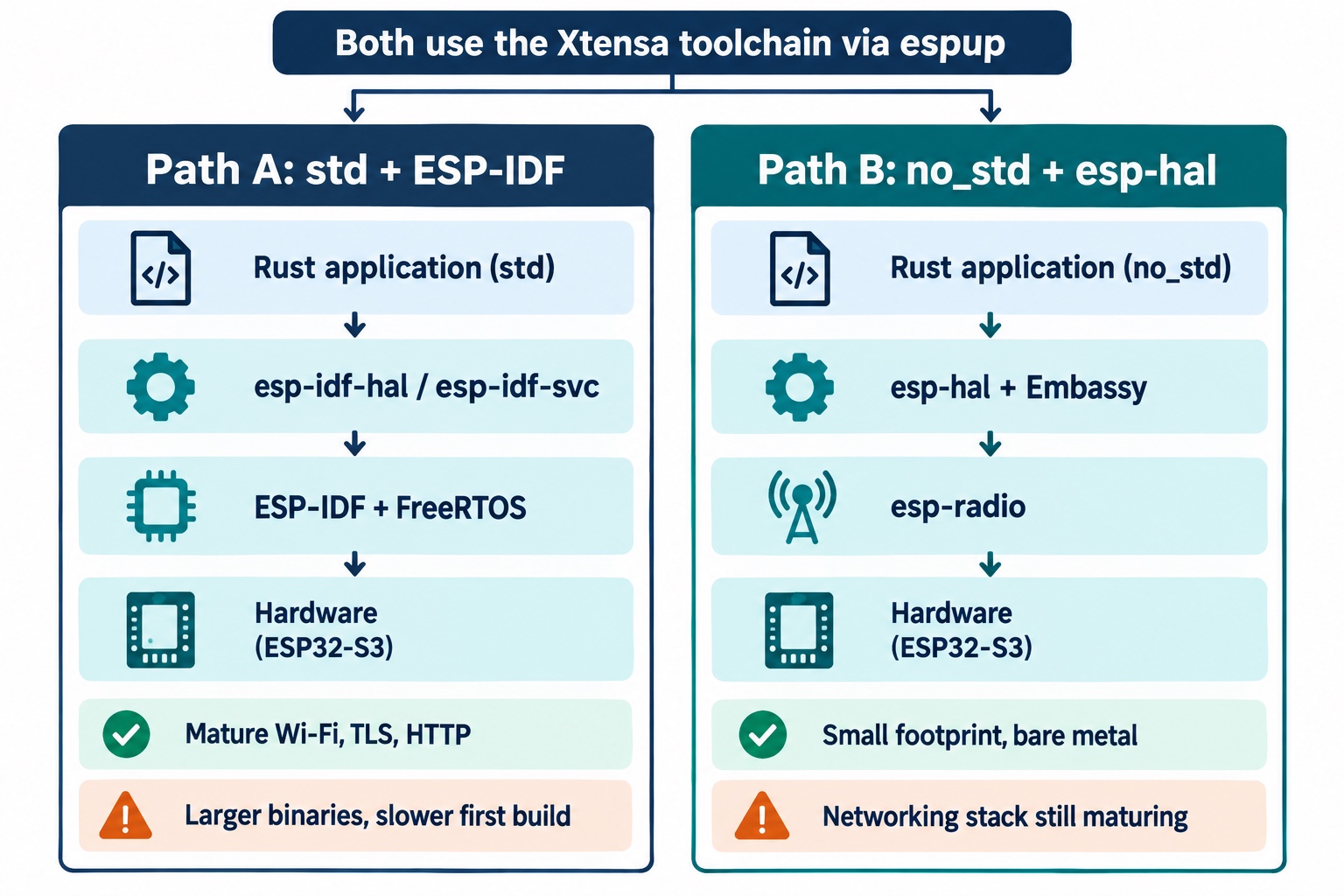
Path A: std on ESP-IDF
The first path runs Rust’s full standard library on top of ESP-IDF. This sounds impossible on a microcontroller (we said std assumes an operating system), so how does it work? The answer is that ESP-IDF supplies the operating-system services std expects, and a stack of Rust crates bridges the two.
At the bottom sits esp-idf-sys, which generates raw Rust bindings to the ESP-IDF C APIs and, through a build tool called embuild, actually downloads and compiles ESP-IDF itself on your first build. On top of that, esp-idf-hal wraps the peripherals (pins, the RMT, buses) in a safe Rust hardware abstraction layer, and esp-idf-svc wraps the higher services (Wi-Fi, HTTP, the event loop, NVS). The clever part is how std is realized: the Rust standard library is wired to the C library ESP-IDF ships (newlib), its threads map onto FreeRTOS tasks, its network sockets go through ESP-IDF’s lwIP TCP/IP stack, and its TLS runs on mbedTLS. The result is that std::thread, std::fs, std::net, and even println! all genuinely work, because every one of them has a real implementation underneath provided by ESP-IDF.
This path is community-maintained (by the esp-rs organization, with Espressif’s involvement), and it is the most mature road for networking today: Wi-Fi, TLS, and HTTP all work and are battle-tested, because they are ESP-IDF’s own well-worn C implementations with a Rust skin. The downsides are concrete. The first build compiles an entire C framework, which is slow and pulls down a few hundred megabytes under ~/.espressif. And the binaries are bigger, because you are carrying ESP-IDF and FreeRTOS along with your code.
Path B: no_std bare-metal with esp-hal
The second path throws out ESP-IDF entirely and runs bare metal, pure Rust against the hardware with no C framework underneath. Its centerpiece is esp-hal, a hardware abstraction layer written from scratch in Rust and funded officially by Espressif. This crate reached its 1.0 release in October 2025 and sits around 1.2.x as of this writing, which matters because a 1.0 means the API is stable enough to build on without churn.
Because there is no operating system here, concurrency does not come from FreeRTOS tasks. Instead the no_std world uses Embassy, an async runtime for embedded Rust that lets you write concurrent code with async/await and schedules it with no operating system underneath. The way it works is worth a sentence, because it is quite different from FreeRTOS. Embassy turns each async task into a state machine that runs until it hits an .await, at which point the task voluntarily hands control back to a tiny scheduler called an executor, which then polls whichever task is ready to make progress next. It all happens in a single call stack with no operating system and no separate per-task stacks, which is exactly why it is so lean. The catch is that it is cooperative: a task only ever yields at an .await. So if one async task runs a long computation or a busy-wait without awaiting anywhere, it starves every other task until it finishes, and nothing can interrupt it, which is the exact opposite of the preemption FreeRTOS gives you on Path A. Good Embassy code awaits often and keeps any purely synchronous burst short.
Wireless comes from esp-radio (recently renamed from esp-wifi), which provides Wi-Fi and Bluetooth drivers for the bare-metal stack. The appeal of this path is that it is the leanest possible footprint and the purest expression of the efficiency argument we made for Rust: no interpreter, no C framework, no operating system, just your compiled code and a thin HAL. The honest downside is maturity in one specific area: the networking stack on bare metal is still stabilizing, and esp-radio is currently beta. For blinking lights and real-time control it is excellent today; for a TLS web client it is less settled than Path A.
When to pick which, and the tools either way
So which do you choose? Pick Path A (std on ESP-IDF) when you need networking now, want the comfort of the full standard library, and do not mind bigger binaries and a slow first build; it is the pragmatic production choice for a connected device today. Pick Path B (no_std with esp-hal) when you want minimal footprint, deterministic real-time behavior, no C dependency, or you are learning how the hardware really works; it is where Espressif is actively investing and where the ecosystem is heading. We will build real demos on both so the difference is not abstract.
A quick tour of the shared tooling, because the same tools serve both paths. espflash (and its cargo integration cargo-espflash) writes your binary to the board and opens a serial monitor, and crucially it supports the S3’s native USB-Serial-JTAG so you flash over the USB port with no buttons. probe-rs is an alternative for debugging and for a logging transport called RTT (Real-Time Transfer), a scheme that ferries log messages out through the chip’s debug port into a connected debugger with very little runtime overhead, instead of over a serial line. For logging, the no_std path typically uses esp-println (simple text) or defmt (a compact, efficient format), while the std path can just use println! and the log crate. For scaffolding a new project, esp-generate creates a no_std project and esp-idf-template creates a std one. And underneath the portable drivers for both sits embedded-hal 1.0, the standard trait set we met earlier.
Hands-On: Setup
Enough theory. Let’s get the toolchain onto an actual Apple M2 MacBook and understand each step, because every command here maps to a concept we just built up. Ready to turn your Mac into something that can compile for a chip it shares no architecture with?
Installing the toolchain
Three tools get installed with cargo first, and then one of them does the heavy lifting.
# Install the toolchain manager, the flasher, and the ESP-IDF linker wrapper
cargo install espup espflash ldproxy
espup install
In the example above, cargo install espup espflash ldproxy pulls three programs. espup is the toolchain manager we discussed: running espup install is what downloads Espressif’s forked Rust and LLVM with Xtensa support, the Xtensa GCC toolchain, and the linker, installing them under the esp toolchain name that our projects’ rust-toolchain.toml selects. espflash is the tool that writes firmware to the board and opens the serial monitor. ldproxy is a small linker wrapper that the std/ESP-IDF path needs, because the ESP-IDF build drives linking in a particular way and ldproxy sits in front of the real linker to make that work; the no_std path does not use it, but installing it now means both demos are ready. The espup install step is a one-time download of a few hundred megabytes and the only part of setup that is specific to the Xtensa S3.
Sourcing the environment
After espup install finishes, it writes a file you must load into your shell before building.
# Put the forked compiler, Xtensa linker, and LIBCLANG on PATH for this shell
source $HOME/export-esp.sh
In the example above, source $HOME/export-esp.sh runs a script espup generated that sets several environment variables for the current shell: it puts the forked compiler and the Xtensa linker (the xtensa-esp32s3-elf-gcc the build invokes) on your PATH, and it points LIBCLANG_PATH at the right library so the bindings generator can parse ESP-IDF’s C headers. The critical detail is the phrase “for this shell”: sourcing affects only the current terminal session, so you must run it in every new shell before you build, or the build fails. Our no_std project even ships a build.rs that detects the missing Xtensa linker and prints a reminder to source this file, which is the single most common first-build stumble.
💡 If a build fails with an error about
xtensa-esp32s3-elf-gccnot being found, you have almost certainly opened a fresh terminal and forgotten tosource $HOME/export-esp.sh. It is not a broken install; the environment just is not loaded in that shell. Many people add thesourceline to their shell profile so it happens automatically, at the cost of every new shell doing that setup.
Scaffolding a project
You never hand-write the files that make a bare main.rs buildable. Two official generators emit that boilerplate for you: the rust-toolchain.toml that pins the esp toolchain, the .cargo/config.toml that sets the Xtensa target and wires espflash in as the runner, and, on the std side, the build.rs and sdkconfig.defaults that drive the ESP-IDF build.
# A no_std / bare-metal project
cargo install esp-generate
esp-generate --chip esp32s3 blinky-no_std

# A std / ESP-IDF project
cargo install cargo-generate
cargo generate esp-rs/esp-idf-template cargo
In the example above, esp-generate --chip esp32s3 produces a no_std project already aimed at our chip: its .cargo/config.toml targets xtensa-esp32s3-none-elf, sets runner = "espflash flash --monitor", and turns on build-std (bare metal has to compile its own copy of core, because there is no prebuilt standard library for this target). cargo generate esp-rs/esp-idf-template does the equivalent for the std path, targeting xtensa-esp32s3-espidf and generating the build.rs that launches the ESP-IDF build through embuild. For each demo below you take the generated project, drop in the main.rs shown, and add the few dependencies listed with it; nothing else is needed to reproduce exactly what we flashed.
The write, build, flash, monitor loop
With the toolchain installed and the environment sourced, the development loop is a single command, and it is worth understanding what that command actually does.
# Compile, flash to the board, and stream the serial output
cargo run --release
In the example above, cargo run does more than compile. Each of our projects has a .cargo/config.toml that sets a runner, which is the command Cargo executes with the freshly-built binary instead of trying to run it on your Mac (it obviously cannot run an Xtensa binary on an Apple CPU). That runner is espflash flash --monitor, so cargo run compiles the firmware, hands the binary to espflash, which writes it to the board’s flash over the native USB port and then immediately opens a serial monitor that streams whatever the program prints. The --release flag builds with optimizations, which on a constrained device is almost always what you want. Because the S3 has that native USB-Serial-JTAG controller, espflash resets the chip into download mode by itself, so you do not touch BOOT or RST; you just run the command and watch the output appear.
That is the entire inner loop: edit code, cargo run --release, read the serial output, repeat. Now let’s write something worth flashing.
Hands-On: Blinky in Both Paradigms
The traditional first embedded program is “blinky”, blinking an LED, because it is the smallest thing that proves your whole toolchain works end to end. Our board makes it more interesting than usual, because its only LED is that addressable WS2812 on GPIO48, so “blink” becomes “drive a precisely-timed color signal”. We are going to reproduce the exact light show the board shipped with, red then green then blue, one second each, on both of our tracks, and the contrast between them makes the two philosophies concrete. Same LED, same result, two different machines underneath. How different can two solutions to one trivial problem really be?
The no_std version
Here is the heart of the bare-metal version, built on esp-hal and its companion esp-hal-smartled. A few lines of ceremony that every bare-metal Rust program needs have been left out of this snippet and explained in prose afterward.
use esp_hal::clock::CpuClock;
use esp_hal::rmt::Rmt;
use esp_hal::time::{Duration, Instant, Rate};
use esp_hal_smartled::{buffer_size, color_order, RmtSmartLeds, WS2812_TIMING};
use esp_println::println;
use smart_leds::{SmartLedsWrite, RGB8};

#[esp_hal::main]
fn main() -> ! {
    let config = esp_hal::Config::default().with_cpu_clock(CpuClock::max());
    let peripherals = esp_hal::init(config);

    // The RMT peripheral, clocked at 80 MHz so one tick is 12.5 ns.
    let rmt = Rmt::new(peripherals.RMT, Rate::from_mhz(80)).unwrap();

    // One WS2812 LED on GPIO48, colors sent in GRB byte order.
    let mut led = RmtSmartLeds::<{ buffer_size::<RGB8>(1) }, _, RGB8, color_order::Grb>::new(
        WS2812_TIMING,
        rmt.channel0,
        peripherals.GPIO48,
        Rate::from_mhz(80),
    )
    .unwrap();

    println!("RGB Demo (Rust / no_std / esp-hal)");

    // Three colors, kept dim at 32 of 255. RGB8 { r, g, b } is just the bytes.
    let red = RGB8 { r: 32, g: 0, b: 0 };
    let green = RGB8 { r: 0, g: 32, b: 0 };
    let blue = RGB8 { r: 0, g: 0, b: 32 };

    loop {
        // Show each color for one second, then move to the next.
        for color in [red, green, blue] {
            led.write([color]).unwrap();

            // Busy-wait one second (no OS, no scheduler to yield to).
            let start = Instant::now();
            while start.elapsed() < Duration::from_secs(1) {}
        }
    }
}
In the example above, every line reflects the bare-metal reality we have been building toward. esp_hal::init(config) is the very first thing the program does: it takes ownership of all the chip’s peripherals and returns a struct from which you pull each one exactly once, which is how Rust’s type system guarantees at compile time that two parts of your code never grab the same peripheral and fight over it. Rmt::new(peripherals.RMT, Rate::from_mhz(80)) sets up the RMT peripheral, and this is the crucial piece: RMT (the Remote Control peripheral) is dedicated hardware that generates precisely-timed pulse trains without the CPU’s involvement. We clock it at 80 MHz so each of its ticks is 12.5 nanoseconds, fine-grained enough to build the ~800 kHz WS2812 waveform. Why does this matter? Because the alternative, “bit-banging” the signal by toggling the pin in a software loop, would require the CPU to count nanoseconds perfectly with interrupts disabled (interrupts being hardware signals that would otherwise yank the CPU away mid-count), and any hiccup corrupts the color; handing the job to RMT means the hardware emits a flawless waveform while the CPU moves on.
The RmtSmartLeds::<{ buffer_size::<RGB8>(1) }, _, RGB8, color_order::Grb>::new(...) line is dense, so let’s unpack the parts that carry meaning. The buffer_size::<RGB8>(1) is a compile-time constant sizing an internal buffer for exactly one LED’s worth of pulse data; it is computed at compile time so no dynamic allocation is needed to hold the waveform. The color_order::Grb is not a detail you can skip: the WS2812 expects its three color bytes in GRB order (green, then red, then blue), not the RGB order you would assume, because that is simply how the LED’s internal controller latches them. Tell the driver RGB and your reds and greens swap. The WS2812_TIMING constant carries the exact high/low pulse durations the WS2812 datasheet specifies, so the driver knows how long a “1” bit and a “0” bit each hold the line high.
The loop itself is deliberately plain. We define three colors as RGB8 { r, g, b } values, each field a brightness byte from 0 to 255, kept dim at 32 so the LED does not dazzle you. Then for color in [red, green, blue] steps through them in order, writing each to the LED and holding it before moving on. The holding is the final two lines, and they are the signature of bare metal: Instant::now() followed by a while loop that spins until a second has elapsed. This is a busy-wait, where the CPU sits in a tight loop doing nothing but checking the clock, burning 100% of the core for the entire second. On bare metal with no operating system there is no scheduler to yield to, so there is nothing more useful the core could be doing anyway; the wait is honest about what the hardware is doing.
Two pieces were trimmed from the snippet and deserve a prose mention. Every no_std Rust program must declare a panic handler (a function that runs if the code panics, since there is no operating system to catch it) and this project’s main.rs has a minimal one that just loops forever. It also calls an esp_alloc::heap_allocator! macro to set up a small heap, because even bare-metal code sometimes needs dynamic allocation and in no_std you must provide the allocator yourself. And there is a one-line esp_app_desc! macro that emits an application descriptor the bootloader looks for. These are boilerplate you write once and forget, which is why they are not in the teaching snippet.
To build it, the generated Cargo.toml needs these dependencies:
[dependencies]
esp-hal = { version = "1.2", features = ["esp32s3", "unstable"] }
esp-hal-smartled = "0.18"
smart-leds = "0.4"
esp-println = { version = "0.18", features = ["esp32s3"] }
esp-alloc = { version = "0.11", features = ["esp32s3"] }
esp-bootloader-esp-idf = { version = "0.6", features = ["esp32s3"] }
critical-section = "1.2"
In the example above, esp-hal is the bare-metal HAL itself, with the esp32s3 feature selecting our chip and unstable unlocking APIs like RMT that have not yet been frozen. esp-hal-smartled and smart-leds are the WS2812 driver and the color types it works with (the RGB8 color value and the SmartLedsWrite trait that led.write(...) comes from). esp-println provides the println! that reaches the serial monitor with no operating system behind it, esp-alloc is the allocator the heap_allocator! macro installs, and esp-bootloader-esp-idf supplies the esp_app_desc! macro whose descriptor the bootloader looks for. The last one, critical-section, provides the small locking primitive esp-hal relies on to share data safely with interrupt handlers. These are the crates the trimmed boilerplate referenced.
The std version
Now the same effect on Path A, using esp-idf-hal and the ws2812-esp32-rmt-driver crate. Watch how much shorter and more familiar it looks.
use esp_idf_hal::peripherals::Peripherals;
use esp_idf_svc::log::EspLogger;
use log::info;
use smart_leds::{SmartLedsWrite, RGB8};
use std::thread::sleep;
use std::time::Duration;
use ws2812_esp32_rmt_driver::Ws2812Esp32Rmt;

fn main() {
    esp_idf_sys::link_patches();
    EspLogger::initialize_default();

    let peripherals = Peripherals::take().unwrap();
    let led_pin = peripherals.pins.gpio48;
    let channel = peripherals.rmt.channel0;

    let mut ws2812 = Ws2812Esp32Rmt::new(channel, led_pin).unwrap();

    info!("RGB Demo (Rust / std / esp-idf-hal)");

    // Three colors, kept dim at 32 of 255, same as the no_std version.
    let red = RGB8 { r: 32, g: 0, b: 0 };
    let green = RGB8 { r: 0, g: 32, b: 0 };
    let blue = RGB8 { r: 0, g: 0, b: 32 };

    loop {
        // Show each color for one second, then move to the next.
        for color in [red, green, blue] {
            ws2812.write([color].into_iter()).unwrap();

            // FreeRTOS sleeps this task for one second; other tasks run meanwhile.
            sleep(Duration::from_secs(1));
        }
    }
}
In the example above, the differences from the no_std version are exactly the differences between the two tracks. It opens with esp_idf_sys::link_patches(), a call whose job is to defeat the linker’s dead-code elimination for a handful of symbols. ESP-IDF ships patched versions of certain C-library functions, but because nothing in your Rust code references them by name, the linker would normally strip them out as unused; link_patches holds a reference so they survive into the final binary. Skip it and you can get subtle, hard-to-trace misbehavior at runtime, which is why it must be called once, and goes first. Then EspLogger::initialize_default() routes the log crate through ESP-IDF’s own logging system, which is why the next line uses info! rather than println!: on this path your log messages flow through ESP-IDF’s logger and come out on the same console as the boot log, formatted with ESP-IDF’s timestamp and tag convention, instead of being written directly to the serial port the way no_std’s println! is.
Peripherals::take() is the std-side equivalent of esp_hal::init: it hands you the single instance of the peripherals struct (the take name signals you get it exactly once), and from it you pull gpio48 and rmt.channel0. Ws2812Esp32Rmt::new(channel, led_pin) constructs the driver, which internally owns that RMT channel and the pin and encodes each color into the WS2812 waveform for you, so the GRB ordering and the pulse timing we labored over in the no_std version are handled inside this crate. The color loop is identical to the no_std one: the same three RGB8 values, stepped through in the same order.
The payoff line is the last one: sleep(Duration::from_secs(1)). This is the standard library’s std::thread::sleep, and here it does something the no_std busy-wait could not. Because this program runs on FreeRTOS, calling sleep tells the scheduler “put this task to sleep for one second”, and the scheduler hands the core to other tasks during that window, including the idle task that feeds the hardware watchdog timer. The watchdog timer is a piece of hardware whose whole job is to catch a hung program: it counts down on its own, and healthy firmware must periodically reset it (the usual verbs are “feed” or “pet” the watchdog) to prove it is still making progress. If the countdown ever reaches zero, the watchdog assumes the code is stuck in a loop or deadlocked and reboots the chip to recover. On FreeRTOS the low-priority idle task is what feeds it, so a task that yields with sleep lets the idle task run and keep the watchdog happy. The CPU is not burned; it does useful work (or genuinely idles to save power) while our LED waits. That single line is the entire difference between the two concurrency models made visible: bare metal spins, the operating system yields.
💡 This is why a long un-yielding busy-wait is dangerous on the
std/FreeRTOS path specifically. If a task spins without ever yielding, the idle task never gets to run, the watchdog is never fed, and after a second or two the chip reboots on its own with aTask watchdog got triggeredmessage. Our bare-metalno_stdbusy-wait was perfectly fine because there is no FreeRTOS idle task in that picture and nothing is waiting to be fed, but drop that same spin loop into astdtask and you have quietly built yourself a reboot timer.
This version’s Cargo.toml pulls in the ESP-IDF stack:
[dependencies]
esp-idf-hal = "0.46"
esp-idf-sys = "0.37"
esp-idf-svc = "0.52"
log = "0.4"
ws2812-esp32-rmt-driver = { version = "0.14", features = ["smart-leds-trait"] }
smart-leds = "0.4"

[build-dependencies]
embuild = "0.33"
In the example above, the three esp-idf-* crates are the layers we met earlier (-sys for the raw bindings, -hal for the peripherals, -svc here only for its logger), and their versions have to move together, because esp-idf-sys links the ESP-IDF C libraries exactly once and a mismatched -hal or -svc would pull in a second, conflicting copy. ws2812-esp32-rmt-driver is the WS2812 driver for this path, and embuild is the build-time machinery that fetches and compiles ESP-IDF. The generated sdkconfig.defaults also carries one tweak, CONFIG_ESP_MAIN_TASK_STACK_SIZE=8000, which gives the task that runs our main a comfortable stack.
What actually printed, and what it cost
Both programs were flashed to the real board, and here is what came back over the serial monitor. The no_std binary, after a short esp-hal and esp-idf-bootloader boot log, printed:
RGB Demo (Rust / no_std / esp-hal)The std binary printed its line after a much longer ESP-IDF boot log, which includes the framework announcing itself:
I (310) app_init: ESP-IDF: v5.3.3
I (330) main_task: Calling app_main()
I (360) blinky_std: RGB Demo (Rust / std / esp-idf-hal)
In the example above, the std output tells a story the no_std output does not. The ESP-IDF: v5.3.3 line is the C framework we pulled in announcing its version as it initializes; the Calling app_main() line is FreeRTOS’s main task about to call into our main; and the I (360) prefix is ESP-IDF’s log format, where the number in parentheses is milliseconds since boot and blinky_std is the tag derived from our package name. The boot log elsewhere also reports the heap initialization leaving roughly 336 KiB of RAM free after the framework loads, which is memory our program did not have to think about but did have to give up to ESP-IDF. The no_std program has no such framework to announce, so it boots and prints almost immediately.
Now the honest, concrete evidence of the footprint difference we promised back when we dismissed the “N times faster” folklore. The no_std application came out at 82,864 bytes of flashed firmware. The std application doing the identical LED cycle came out at 441,696 bytes, more than five times larger. That gap is ESP-IDF and FreeRTOS and newlib riding along inside the std binary. Neither number is “bad”, a 16 MB flash swallows either one without noticing, but the measurement is the real argument: the bare-metal path is dramatically leaner, and if you were fitting a program into a tiny flash or caring about every kilobyte, that difference is the whole ballgame. Same blinking light, two machines, one of them five times the size of the other.
Hands-On: Wi-Fi and a JSON API
Blinking a light is the “hello world” of hardware, but the reason you reach for an ESP32 specifically is the radio. So let’s do the thing the chip exists for: connect to Wi-Fi, make an HTTPS request to a real API on the public internet, and parse the JSON that comes back. This is the std/ESP-IDF path, and this is precisely the kind of task where that path’s maturity earns its keep. Why std here and not the leaner bare-metal track? We will answer that squarely once we have seen it work.
The three singletons
Networking on ESP-IDF starts by taking ownership of three things, and each one is a singleton you can take exactly once.
let peripherals = Peripherals::take()?;
let sys_loop = EspSystemEventLoop::take()?;
let nvs = EspDefaultNvsPartition::take()?;
In the example above, these three lines set up the backbone every ESP-IDF networking program needs, and each take() returns the one and only instance of its resource. Peripherals::take() gives us the peripherals struct as before, and from it we will use the modem, the peripheral that owns the actual Wi-Fi and Bluetooth radio hardware. EspSystemEventLoop::take() creates the system event loop, which is the channel through which the Wi-Fi driver delivers asynchronous events: “the radio started”, “we associated with the access point”, “we got an IP address”. The Wi-Fi driver does its work in the background and reports progress by posting events here, and the blocking helper we use next listens on this loop to know when each stage completes.
The third one, EspDefaultNvsPartition::take(), is worth dwelling on because it is non-obvious why a Wi-Fi program needs storage. NVS is non-volatile storage, that small key-value area in flash we saw in the partition table at offset 0x9000. The Wi-Fi driver requires it because the radio needs calibration data, physical-layer tuning values that depend on the specific chip and its environment, and computing that calibration from scratch on every boot would be slow. So the driver writes the calibration into NVS the first time and reads it back on subsequent boots, which both speeds up startup and keeps the radio well-tuned. Without an NVS partition to hand it, the Wi-Fi driver has nowhere to persist that data and initialization fails. Think of it like a musician tuning an instrument: doing it fully from cold every single time is slow, so you note the tuning and restore it quickly next time.
Connecting to the network
With the singletons in hand, we wrap the Wi-Fi driver and connect.
let mut wifi = BlockingWifi::wrap(
    EspWifi::new(peripherals.modem, sys_loop.clone(), Some(nvs))?,
    sys_loop,
)?;

let config = Configuration::Client(ClientConfiguration {
    ssid: CONFIG.wifi_ssid.try_into().unwrap(),
    auth_method: AuthMethod::WPA2Personal,
    password: CONFIG.wifi_pass.try_into().unwrap(),
    ..Default::default()
});
wifi.set_configuration(&config)?;

wifi.start()?;
wifi.connect()?;
wifi.wait_netif_up()?;
In the example above, EspWifi::new(peripherals.modem, sys_loop.clone(), Some(nvs)) constructs the Wi-Fi driver by handing it the three things it needs: the modem peripheral (the radio), a handle to the event loop (so it can post those progress events), and the NVS partition (for the calibration data we just discussed). Wrapping it in BlockingWifi::wrap(...) is a convenience: the raw driver is event-driven and asynchronous, and BlockingWifi turns the connect sequence into straight-line blocking calls that return only when each stage is actually done, which is far easier to reason about for a simple program.
The ClientConfiguration describes the network to join. “Client” here means station mode, where the board joins an existing access point rather than becoming one itself. The ssid and password are the network name and key, and auth_method: AuthMethod::WPA2Personal tells the driver to expect the WPA2 security that home and office networks almost universally use. The try_into() calls convert the plain strings into the fixed-capacity string types the driver requires, because on an embedded target these are stored in buffers of bounded size rather than growable heap strings.
Then the three-step connect sequence, each a blocking call that waits on the event loop. start() powers up the radio and returns once it reports started. connect() associates with the access point and authenticates, returning once associated. wait_netif_up() waits for the network interface to be fully up, which specifically means DHCP has finished and the board has been handed an IP address. Only after all three succeed can we actually send traffic. On the real board these produced the following, with ESP-IDF’s millisecond timestamps showing how long each stage took:
I (723)  wifi_json_std: Wi-Fi started
I (3223) wifi_json_std: Wi-Fi connected
I (4223) wifi_json_std: Wi-Fi netif up
I (4223) wifi_json_std: Connected. IP info: IpInfo { ip: 192.168.0.105, subnet: Subnet { gateway: 192.168.0.1, mask: Mask(24) }, ... }
In the example above, the timestamps tell you where the time goes: the radio started almost immediately (723 ms), association with the access point took a couple of seconds (3223 ms), and the DHCP lease landed shortly after (4223 ms), at which point we print the assigned IP address 192.168.0.105 and the gateway. This is the ordinary life of a device joining a network, made visible.
The HTTPS request and JSON parsing
With an IP address, we can make a secure request. This is where TLS enters, and TLS needs one thing explained.
let config = HttpConfiguration {
    crt_bundle_attach: Some(esp_idf_svc::sys::esp_crt_bundle_attach),
    ..Default::default()
};
let mut client = HttpClient::wrap(EspHttpConnection::new(&config)?);

let request = client.request(Method::Get, URL, &[("accept", "application/json")])?;
let mut response = request.submit()?;

let mut buf = [0u8; 512];
let len = io::try_read_full(&mut response, &mut buf).map_err(|e| e.0)?;
let todo: Todo = serde_json::from_str(std::str::from_utf8(&buf[..len])?)?;
In the example above, the crt_bundle_attach: Some(esp_idf_svc::sys::esp_crt_bundle_attach) field is the one that makes HTTPS possible, and it deserves the full explanation. When your device connects to https:// anything, TLS has to verify that the server really is who it claims to be, and it does that by checking the server’s certificate against a set of trusted root certificate authorities. Think of it like a bouncer at a members-only door: each guest presents an ID, and the bouncer does not judge the ID on its own merits, they check that it was signed by a name on a short printed list of trusted issuers kept behind the counter, and they turn away anyone whose ID came from an issuer not on that list. The certificate authorities are that printed list, and the server’s certificate is the ID being presented. On your laptop that trusted set comes with the operating system. The ESP32 has no such built-in set, so ESP-IDF bundles a copy of the Mozilla root certificate store (the same list of trusted authorities browsers use) and esp_crt_bundle_attach is the function that wires that bundled store into the TLS client. Without it, the handshake has nothing to verify the server against and every HTTPS request fails. The underlying TLS work is done by mbedTLS, which is why this request is stack-hungry enough that the project bumps the task stack size in its config.
EspHttpConnection::new(&config) creates the connection with that TLS configuration, and HttpClient::wrap gives it a friendly request API. The client.request(Method::Get, URL, ...) builds a GET request to the URL (https://jsonplaceholder.typicode.com/todos/1, a free mock API), and request.submit() sends it and returns the response. We then read the body into a fixed 512-byte buffer, which is plenty because the payload is tiny, and here is where serde earns its place: serde_json::from_str parses the JSON text and deserializes it directly into a Rust struct we defined, a Todo with typed fields. serde is Rust’s serialization framework; by annotating a struct with #[derive(Deserialize)] (and a #[serde(rename = "userId")] to map the API’s camelCase field onto our snake_case user_id), we get compile-time-checked, type-safe parsing with no manual string fiddling.
💡 Be deliberate about that fixed 512-byte buffer when you adapt this code. Point the same code at a real API whose response is larger and the body overflows the buffer and is silently truncated, after which
serdefails to parse the half a JSON document it did get and hands you an error that gives no hint the real problem was a too-small buffer. For responses whose size you do not control, read in a loop into a growableVec(you have a heap on thestdpath, so this is easy) or stream the body and parse it incrementally rather than reading it all into one fixed array.
The real run produced:
I (6013) wifi_json_std: -> GET https://jsonplaceholder.typicode.com/todos/1
I (6043) wifi_json_std: <- 200
I (6053) wifi_json_std: Parsed todo #1: Todo { user_id: 1, id: 1, title: "delectus aut autem", completed: false }
In the example above, the -> GET line is our request going out, the <- 200 is the HTTP success status coming back (and note the whole round trip took about 30 milliseconds, from 6013 to 6043), and the final line is the parsed Rust struct printed with its debug formatting, proving the JSON became a real typed Todo value with user_id, id, title, and completed fields. From bare chip to a parsed HTTPS API response, entirely in Rust.
Dependencies, config, and credentials
Reproducing this demo takes three supporting pieces beyond the generated scaffold. First, the dependencies in Cargo.toml:
[dependencies]
esp-idf-svc = "0.52"
embedded-svc = "0.29"
serde = { version = "1", features = ["derive"] }
serde_json = "1"
anyhow = "1"
log = "0.4"
toml-cfg = "0.2"

[build-dependencies]
embuild = "0.33"
toml-cfg = "0.2"
In the example above, esp-idf-svc is the services layer that provides the Wi-Fi station, the event loop, NVS, and the HTTPS client; it re-exports esp-idf-hal as esp_idf_svc::hal and esp-idf-sys as esp_idf_svc::sys, so this one crate pulls the whole stack in at matching versions. embedded-svc supplies the portable traits that layer implements, serde and serde_json do the typed JSON parsing, and anyhow gives the Result-returning main its error type. toml-cfg appears in both [dependencies] and [build-dependencies] because it does two jobs: at build time it reads cfg.toml, and at compile time it generates the CONFIG constant your code reads.
Second, because the mbedTLS handshake is stack-hungry, the project’s sdkconfig.defaults enlarges the stack of the task that runs main:
CONFIG_ESP_MAIN_TASK_STACK_SIZE=12000In the example above, that single line raises the main task’s stack to 12 KB. Leave it out and the TLS handshake overruns the default stack partway through the request, and the chip aborts with a stack-overflow panic that gives no obvious hint the real cause was a too-small stack.
Third, the credentials. You may have noticed the code reads CONFIG.wifi_ssid rather than a hardcoded network name. Those come from a file through a crate called toml-cfg: you put your SSID and password in a cfg.toml file that is gitignored (so your real credentials never get committed), and toml-cfg reads that file at compile time and bakes the values into the binary as constants. It is compile-time injection, the secrets living in a local file rather than the source and getting substituted in when you build. The file is a single table whose name matches the package:
[wifi-json-std]
wifi_ssid = "your-network-name"
wifi_pass = "your-network-password"
In the example above, the table header [wifi-json-std] must match the crate’s package name exactly, because that is how toml-cfg knows which table maps onto the Config struct. Name it anything else and the fields fall back to their empty-string defaults, and the program bails out at startup with the “Wi-Fi SSID is empty” message. You create it by copying the committed cfg.toml.example to cfg.toml and filling in your 2.4 GHz network.
The no_std equivalent, and why we chose std
Could we have done this on the bare-metal track? Yes, and sketching how answers the question we parked earlier. On no_std you would assemble the networking stack from separate crates rather than getting it bundled: esp-radio (the renamed esp-wifi) provides the Wi-Fi driver, embassy-net provides the TCP/IP stack, reqwless provides the HTTP(S) client, and embassy-executor runs it all as async tasks. In rough shape it reads like this:
// Illustrative no_std sketch (beta ecosystem, not the demo we flashed).
let wifi = esp_radio::wifi::new(&radio_init, peripherals.WIFI)?;
let stack = embedded_net_stack(wifi);          // embassy-net TCP/IP stack
let mut client = reqwless::client::HttpClient::new(&stack, &tls);
let mut resp = client.request(Method::GET, URL).await?.send(&mut rx_buf).await?;
In the example above (which is illustrative, not the code we flashed), the work is spread across four crates that you wire together yourself: esp-radio brings up the Wi-Fi hardware, embassy-net gives you the TCP/IP stack that turns a raw radio link into something you can open sockets on, reqwless speaks HTTP and TLS over those sockets, and the whole thing runs under embassy-executor’s async runtime with .await at each step instead of the blocking calls the std version used. It genuinely works, and for a lean real-time device it is attractive. But every one of those pieces is younger and less settled than ESP-IDF’s decade-old C networking stack, and esp-radio in particular is still beta. That is the honest reason we chose std for this demo: networking is the one area where the std/ESP-IDF path is clearly the pragmatic choice today, because it hands you a mature, integrated, TLS-capable stack instead of four fast-moving crates you assemble yourself. For blinking lights, bare metal wins on footprint; for talking to the internet, std wins on maturity, at least for now.
💡 The ESP32-S3 radio is 2.4 GHz only. It has no 5 GHz hardware at all, so it will never see, let alone join, a 5 GHz-only SSID no matter what you type. If your connect sequence hangs forever at the
connect()stage, the first thing to check is that you pointed it at your network’s 2.4 GHz band. This catches people constantly, because many modern routers hide both bands behind one name and quietly prefer 5 GHz for laptops.
💡 If the board resets the instant Wi-Fi starts, often with a
Brownout detector was triggeredline in the log, suspect power before you suspect your code. Bringing the radio up draws brief spikes of current that a thin charge-only USB cable or a weak laptop or hub port cannot always deliver, so the chip’s on-chip brownout detector (hardware that watches the supply voltage and resets the chip if it sags too low) trips and reboots. The fix is almost always a better cable or a powered port, not a code change: the very same firmware can run fine on one cable and reboot-loop on another.
Try It Yourself
Want to see your own board light up instead of reading about mine? Everything in this article is real, flashed-and-verified code, and all three projects are public so you can run exactly what we walked through. The companion source lives in the runtimepanic-projects repository, under projects/esp32-intro, and it contains the three demos as separate crates: blinky-no_std (the bare-metal esp-hal LED cycle), blinky-std (the ESP-IDF std LED cycle), and wifi-json-std (the Wi-Fi and HTTPS JSON demo).
Getting them running on your own board is the same loop we set up earlier. Clone the repository, install the toolchain with cargo install espup espflash ldproxy and espup install, then source $HOME/export-esp.sh in your shell. For the two blinky demos you can go straight to cargo run --release inside the project folder. For the Wi-Fi demo there is one extra step: copy cfg.toml.example to cfg.toml and fill in your 2.4 GHz network’s name and password, since those are injected at compile time and are deliberately not committed. Then cargo run --release as usual.
If you have an ESP32-S3 board of your own (it does not have to be the exact GERUI N16R8; any S3 dev board will do, though the LED pin may differ from GPIO48 on other boards), flash these to it and watch the LED breathe and the JSON come back over the serial monitor. If you have one of the RISC-V boards instead, like a C3 or C6, the std demos port with modest changes and you get to skip the espup fork entirely. The fastest way to make all of this concrete is to see your own board light up, so clone the esp32-intro projects and flash one.
Wrap-Up and Where Next
We started with a twelve-dollar board doing something inexplicable out of the bag: cycling an LED under a Python program with no computer attached. By now that moment should feel less like magic and more like a stack of layers you can name. There is a chip, the Xtensa ESP32-S3 silicon, wrapped in a module, the certified WROOM-1 can that adds flash and PSRAM and an antenna, mounted on a dev board that adds USB and buttons so a human can work with it. On reset it runs a relay of bootloaders that read a partition table and launch an app, which executes in place from flash with no operating system required. On top of that bare metal you can layer as much or as little as you want: nothing at all (no_std), or a small real-time operating system and a full C framework (ESP-IDF with FreeRTOS, giving you Rust’s std). The factory Python was an interpreter running as a task on exactly that stack.
Then we made the honest case for Rust: not a mythical speed multiplier, but native compiled code with no interpreter, deterministic memory management with no garbage-collection pauses, memory safety enforced at compile time with no runtime cost, and a real driver ecosystem through embedded-hal. We met the two tracks, confronted the Xtensa toolchain fork that espup papers over, and then built three working programs: the same LED cycle on bare-metal esp-hal and on std/ESP-IDF (an 83 KB binary versus a 442 KB one, the footprint argument made concrete), and a Wi-Fi client that fetched and parsed a real HTTPS JSON response.
Where should you go from here? The single best resource is The Rust on ESP Book, the official guide to the whole ecosystem. The code lives under the esp-rs organization on GitHub, including esp-hal with its own documentation for the bare-metal path. The community-maintained awesome-esp-rust list collects drivers, examples, and projects, and there is an active Matrix channel at #esp-rs:matrix.org where the maintainers and users hang out. If you want structured, hands-on training, both Ferrous Systems and Espressif run embedded Rust courses with published materials.
One honest closing note on maturity, because choosing a path matters. The std/ESP-IDF track is production-usable today for networked applications; it rides a decade of battle-tested C underneath, and if you are shipping a connected device this quarter, it is the safe choice. The no_std/esp-hal track is where Espressif is putting its official investment, it hit a stable 1.0, and it is the better embodiment of everything that makes Rust compelling on small hardware: lean, deterministic, no C framework. Its one soft spot is the wireless stack, which is still stabilizing, but that gap is closing fast. Pick std when you need the network today; pick no_std when you want the leanest, most real-time Rust and are happy to grow with a rapidly maturing ecosystem. Either way, you now understand the whole machine from the silicon up, and the best next step is to flash something to a board of your own and watch it come alive.