Most Node.js APIs feel fast until one endpoint starts doing “just a little” heavy work. Maybe it generates a report, parses a large file, compresses an image, or runs a calculation that looked harmless during development. Then suddenly, one request is enough to make the whole server feel stuck.
This is confusing at first because Node.js is usually introduced as a runtime that is really good at handling many things at once. It can accept HTTP requests, read files, talk to databases, stream responses, and keep the application responsive without creating a new thread for every request.
That is true. But it also creates a tiny misunderstanding.
When people hear “Node.js is asynchronous”, they sometimes assume every expensive task automatically runs somewhere else. Unfortunately, that is not how it works. If your JavaScript code is doing a long-running calculation, parsing a huge file, compressing data, resizing images, generating reports, processing logs, or running some expensive algorithm, that work can still block the main thread.
In this article, we are going to look at how to use multiple CPU cores in Node.js for normal synchronous work. We will start with the blocking problem, move the work away from the main thread as a first optimization, and then focus on the more important idea: dividing the work across a pool of worker threads.
We are not going to build a production-grade job system here. The goal is simpler: understand the pattern well enough that you can apply it to everyday CPU-heavy programs.

The problem with CPU-heavy work
Node.js runs your JavaScript on a main thread. That main thread also runs the event loop. The event loop is what lets Node.js pick up callbacks, handle timers, process incoming requests, and continue moving the application forward.
For I/O work, this is excellent. If you ask Node.js to wait for a database query, Node.js does not sit there doing nothing. It registers the work and comes back when the result is ready.
However, CPU-heavy JavaScript is different. If your code starts calculating something for five seconds, the main thread is busy for those five seconds. During that time, it cannot run other JavaScript callbacks.
Let’s see this with an Express server. Since most Node.js developers are familiar with Express, we will use it for the examples.
// server.js
import express from "express";

const app = express();

function fibonacci(n) {
  if (n < 2) {
    return n;
  }

  return fibonacci(n - 1) + fibonacci(n - 2);
}

app.get("/", (req, res) => {
  res.send("OK");
});

app.get("/fib/:n", (req, res) => {
  console.time(`fib-${req.params.n}`);
  const value = fibonacci(Number(req.params.n));
  console.timeEnd(`fib-${req.params.n}`);

  res.json({ value });
});

app.listen(3000, () => {
  console.log("Server running on http://localhost:3000");
});
The source is pretty straightforward. The / route returns OK, while /fib/:n calculates the nth Fibonacci number using a slow recursive implementation.
Now here is the problem. If one request calls /fib/45, the main thread starts running fibonacci(45). Until that function returns, even the simple / route has to wait.
You can simulate this with two terminals.
# Terminal 1
node server.js
# Terminal 2
curl http://localhost:3000/fib/45While that request is still running, quickly call the health route from another terminal.
# Terminal 3
curl http://localhost:3000/The / request looks simple, but it still waits because the main thread is busy.
# Terminal 1 output
Server running on http://localhost:3000
fib-45: 8.214s
# Terminal 2 output
{"value":1134903170}
# Terminal 3 output, printed only after /fib/45 completes
OKThat is not because Express is slow. It is because our JavaScript is occupying the only thread that can run the request handler.
💡
asyncandawaitdo not fix this by themselves. They make waiting for asynchronous work easier to write. They do not move CPU-heavy JavaScript to another CPU core.
Potential solutions
Before we jump into worker threads, let’s look at the usual options. This matters because not every slow Node.js program needs the same fix.
Option 1: Make the algorithm faster
This is the boring answer, but it is often the best first step. If an algorithm is accidentally doing too much work, adding threads will only make an inefficient program more complicated.
Our recursive Fibonacci function is intentionally inefficient. If we only wanted the nth Fibonacci number, we could write a much faster iterative version.
function fibonacci(n) {
let previous = 0;
let current = 1;
for (let index = 0; index < n; index++) {
const next = previous + current;
previous = current;
current = next;
}
return previous;
}This version is much faster because it does not repeat the same work again and again. So yes, fix the algorithm first when that is possible.
However, after a point, some work is simply expensive. Maybe you need to calculate many values, process thousands of records, transform a large dataset, or run a synchronous library that blocks while doing CPU work. In those cases, a better algorithm helps, but parallelism can still matter.
Option 2: Break the work into event-loop-friendly chunks
Another option is to break the computation into chunks and yield back to the event loop between chunks.
async function processItems(items) {
const results = [];
for (let index = 0; index < items.length; index++) {
results.push(processItem(items[index]));
if (index % 100 === 0) {
await new Promise((resolve) => setImmediate(resolve));
}
}
return results;
}In this example, we process 100 items and then let the event loop breathe by waiting for setImmediate. This can keep a server responsive because Node.js gets chances to handle other callbacks.
However, this does not use multiple CPU cores. The work still runs on the main thread. We are only slicing it into smaller pieces.
This is useful when responsiveness is the main concern and the total work is not too large. But if you want real parallel execution, we need a different approach.
Option 3: Use multiple Node.js processes
Node.js can also run work in separate processes using child_process or cluster.
A separate process has its own memory, its own event loop, and its own JavaScript runtime. Since it is a real operating system process, the OS can run it on another CPU core.
This approach is useful when you want strong isolation. If the child process crashes, the parent process can survive. It is also useful for running another program, such as ffmpeg, python, or a shell command.
However, processes are heavier than threads. Sharing data between processes is also more expensive because memory is not naturally shared.
For CPU-heavy JavaScript inside the same Node.js application, worker_threads is usually the better starting point.
Option 4: Use worker threads
The modern built-in solution is the node:worker_threads module. Worker threads let us run JavaScript in parallel on separate threads.

This is the important part: worker threads can execute JavaScript at the same time as the main thread. That means a long-running calculation can happen in a worker while the main thread keeps handling HTTP requests.
Worker threads are a good fit for CPU-intensive JavaScript work. They are not a magic improvement for normal database queries, HTTP calls, or file reads. Node.js already handles most I/O efficiently.
Let’s move our Fibonacci calculation into a worker.
// fibonacci-worker.js
import { parentPort, workerData } from "node:worker_threads";
function fibonacci(n) {
if (n < 2) {
return n;
}
return fibonacci(n - 1) + fibonacci(n - 2);
}
const value = fibonacci(workerData.n);
parentPort.postMessage(value);This file is the worker. It receives input through workerData, runs the expensive function, and sends the result back using parentPort.postMessage.
Now let’s use this worker from the Express server.
// server.js
import express from "express";
import { Worker } from "node:worker_threads";
const app = express();
function runFibonacciWorker(n) {
return new Promise((resolve, reject) => {
const worker = new Worker(
new URL("./fibonacci-worker.js", import.meta.url),
{
workerData: { n },
},
);
worker.once("message", resolve);
worker.once("error", reject);
worker.once("exit", (code) => {
if (code !== 0) {
reject(new Error(`Worker stopped with exit code ${code}`));
}
});
});
}
app.get("/", (req, res) => {
res.send("OK");
});
app.get("/fib/:n", async (req, res) => {
console.time(`worker-fib-${req.params.n}`);
const value = await runFibonacciWorker(Number(req.params.n));
console.timeEnd(`worker-fib-${req.params.n}`);
res.json({ value });
});
app.listen(3000, () => {
console.log("Server running on http://localhost:3000");
});This is a good first optimization. When /fib/45 is called, the expensive calculation runs in a worker. The main thread can keep responding to other requests.
Now the same test behaves differently.
# Terminal 2
curl http://localhost:3000/fib/45# Terminal 3, while /fib/45 is still running
curl http://localhost:3000/This time, the health route does not wait for the Fibonacci calculation.
# Terminal 3 output
OK

# Terminal 1 output
Server running on http://localhost:3000
worker-fib-45: 8.391s

# Terminal 2 output
{"value":1134903170}
The heavy request still takes time. We did not make fibonacci(45) faster. We made the server responsive by keeping that synchronous work away from the main thread.
However, remember the larger goal of this article. We do not only want to move the problem away from the main thread. We want to use multiple CPU cores.
One Fibonacci calculation runs on one worker. That means it uses one CPU core for that calculation. To use multiple cores, we need work that can be divided.
Divide the work, then parallelize it
Some problems are naturally divisible. Processing 100 uploaded images, generating 50 reports, calculating metrics for 10,000 users, scanning many log files, or transforming a large list of records can be split into smaller jobs.
The nth Fibonacci problem by itself is not the best example of divisible work. We can move fibonacci(45) to a worker, but splitting one recursive Fibonacci call across many workers would add a lot of coordination overhead.
So let’s make the example closer to everyday backend work. Instead of calculating one Fibonacci number, imagine we need to calculate Fibonacci numbers for a list of inputs.
const inputs = [40, 41, 42, 40, 41, 42, 40, 41];Each item is independent. That is perfect for parallel execution.
Before we write the pool, we need a worker that stays alive and accepts many jobs.
// fibonacci-worker.js
import { parentPort } from "node:worker_threads";

function fibonacci(n) {
  if (n < 2) {
    return n;
  }

  return fibonacci(n - 1) + fibonacci(n - 2);
}

parentPort.on("message", (job) => {
  const value = fibonacci(job.n);
  parentPort.postMessage({ id: job.id, value });
});
Now the worker listens for jobs. Each job has an id so the main thread can match the result with the original item.
Building a small worker pool
Creating a new worker for every item is not a good idea. A worker needs its own JavaScript execution environment, memory, and startup time.
If your machine has 8 CPU cores and you create 500 workers, the operating system has to constantly switch between them. At that point, the program is competing with itself.
The better approach is to create a worker pool. A worker pool starts a fixed number of workers and reuses them for many jobs.
// worker-pool.js
import { availableParallelism } from "node:os";
import { Worker } from "node:worker_threads";

export class WorkerPool {
  nextJobId = 0;
  workers = [];
  queue = [];

  constructor(workerUrl, size = availableParallelism()) {
    this.workerUrl = workerUrl;

    for (let index = 0; index < size; index++) {
      this.workers.push(this.createWorker());
    }
  }

  createWorker() {
    const worker = new Worker(this.workerUrl);
    worker.isBusy = false;

    worker.on("message", (message) => {
      worker.isBusy = false;
      worker.currentJob.resolve(message.value);
      worker.currentJob = undefined;
      this.runNextJob();
    });

    worker.on("error", (error) => {
      worker.isBusy = false;
      worker.currentJob?.reject(error);
      worker.currentJob = undefined;
      this.runNextJob();
    });

    return worker;
  }

  run(data) {
    return new Promise((resolve, reject) => {
      this.queue.push({
        id: this.nextJobId++,
        data,
        resolve,
        reject,
      });

      this.runNextJob();
    });
  }

  runNextJob() {
    const worker = this.workers.find((item) => !item.isBusy);
    const job = this.queue.shift();

    if (!worker || !job) {
      return;
    }

    worker.isBusy = true;
    worker.currentJob = job;
    worker.postMessage({ id: job.id, ...job.data });
  }
}
This pool keeps a list of workers and a queue of jobs. When run is called, the job is added to the queue. If a worker is free, the pool sends the job to that worker. When the worker responds, the promise is resolved and the worker picks up the next job.
We use availableParallelism to choose a reasonable default pool size. This is better than blindly using the number of CPUs because it can account for CPU limits in some environments.
Now our Express server can divide a batch across the pool.
// server.js
import express from "express";
import { WorkerPool } from "./worker-pool.js";

const app = express();
const pool = new WorkerPool(new URL("./fibonacci-worker.js", import.meta.url));

app.use(express.json());

app.get("/", (req, res) => {
  res.send("OK");
});

app.post("/fib/batch", async (req, res) => {
  const inputs = req.body.inputs;
  console.time(`batch-${inputs.length}`);

  const values = await Promise.all(inputs.map((n) => pool.run({ n })));

  console.timeEnd(`batch-${inputs.length}`);
  res.json({ values });
});

app.listen(3000, () => {
  console.log("Server running on http://localhost:3000");
});
Now we are actually using multiple cores. If the pool has 8 workers and the request contains 8 expensive Fibonacci inputs, those 8 jobs can run in parallel.
Let’s call this route with a batch.
curl -X POST http://localhost:3000/fib/batch \
  -H "Content-Type: application/json" \
  -d '{"inputs":[40,41,42,40,41,42,40,41]}'
The response contains one result per input.
{
  "values": [
    102334155, 165580141, 267914296, 102334155, 165580141, 267914296, 102334155,
    165580141
  ]
}
The useful part is the timing. If we processed these inputs one by one on the main thread, the total time would roughly be the sum of all eight calculations.
# Single-thread mental model
fib(40): 1.0s
fib(41): 1.6s
fib(42): 2.6s
fib(40): 1.0s
fib(41): 1.6s
fib(42): 2.6s
fib(40): 1.0s
fib(41): 1.6s
total:   13.0s
With a worker pool, the jobs run in groups based on how many workers are available.
# Example server output on an 8-core machine
Server running on http://localhost:3000
batch-8: 2.842s
The exact numbers will change based on your machine, but the shape is what matters. Instead of doing eight expensive operations one after another, we let multiple CPU cores work at the same time.
This is the core idea. Worker threads are not just a place to hide blocking code. They are a way to divide independent synchronous work across CPU cores.
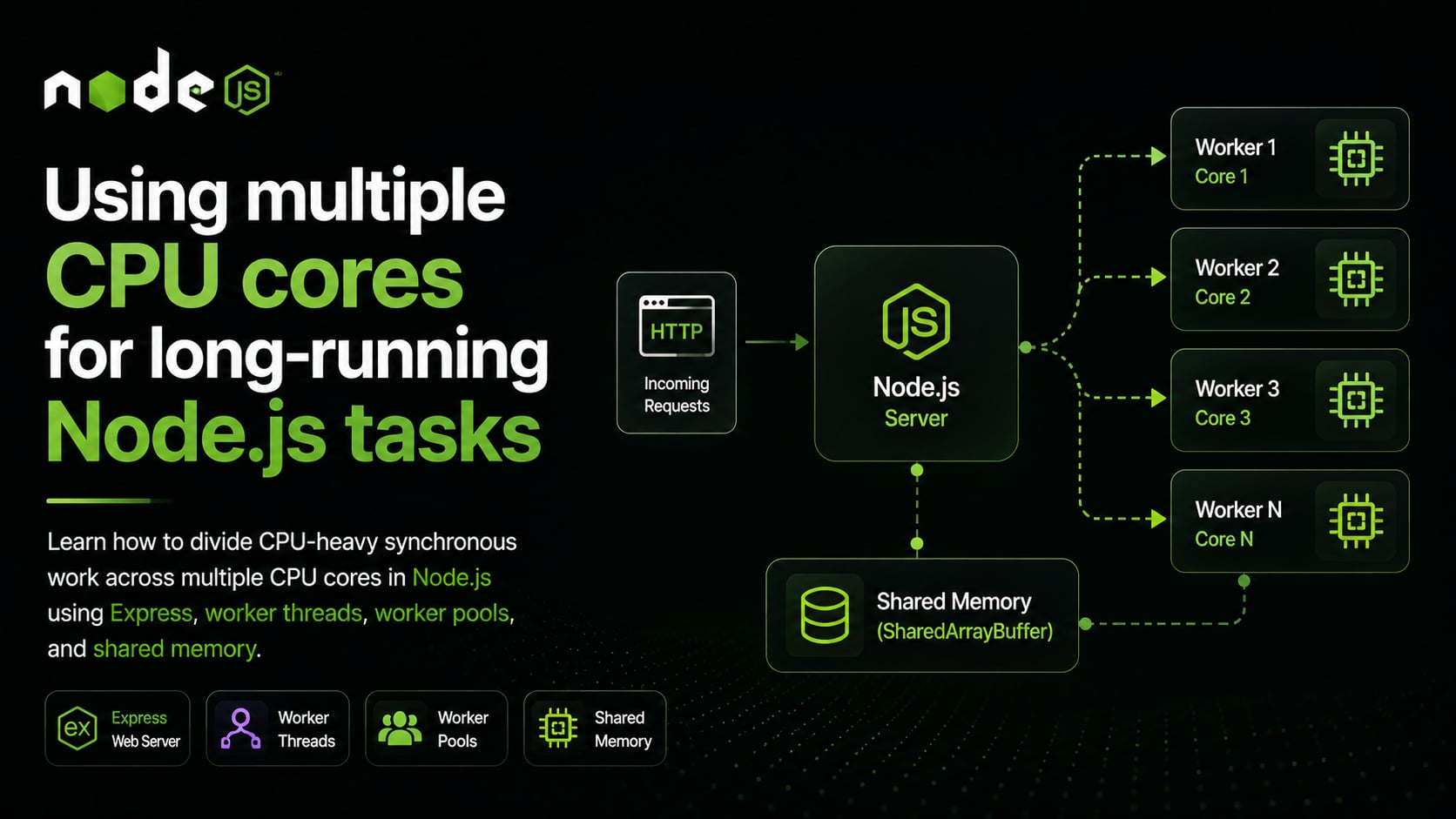
As you can see, the main thread becomes the coordinator. It accepts the HTTP request, validates input, creates jobs, waits for results, and returns the response. The workers do the expensive CPU work.
💡 In production, you might use a mature worker-pool library such as
Piscina. The built-inworker_threadsmodule gives us the foundation, while a library can handle details like queue limits, cancellation, statistics, and better error handling.
A small warning about job size
Parallelism has overhead. Sending a job to a worker takes time. Receiving the result takes time. Managing the queue takes time.
That means worker threads are useful when each job is large enough to justify that overhead.
For example, calculating fibonacci(10) in a worker is probably silly. The message-passing cost may be larger than the calculation itself. But calculating many expensive values, processing large records, compressing files, or generating reports can be a good fit.
If the work is too small, batch it. Instead of sending one tiny item per worker message, send a chunk of items.
// chunk-worker.js
import { parentPort } from "node:worker_threads";

function fibonacci(n) {
  if (n < 2) {
    return n;
  }

  return fibonacci(n - 1) + fibonacci(n - 2);
}

parentPort.on("message", (job) => {
  const values = job.inputs.map(fibonacci);
  parentPort.postMessage({ id: job.id, values });
});
Now each worker receives a list of inputs instead of a single number. This reduces message overhead and lets every worker spend more time doing useful work.
The best chunk size depends on your workload. Start simple, measure, and adjust.
Choosing the right number of workers
It is tempting to think more workers means more speed. That is not always true.
If your machine has 8 available CPU cores, creating 8 CPU-heavy workers is usually a reasonable starting point. Creating 80 workers usually is not. The extra workers spend more time waiting, competing for CPU, and increasing memory pressure.
This is why the worker-pool example used availableParallelism.
import { availableParallelism } from "node:os";

const size = availableParallelism();
For CPU-heavy work, start with the available parallelism and measure. For memory-heavy work, you may need fewer workers because each worker can hold a large amount of data.
This is the part where benchmarking matters. There is no universal number that is correct for every workload.
Memory considerations
So far, we have focused on CPU time. But once you divide work across workers, memory becomes part of the design too.
When you send data to a worker using postMessage, Node.js usually copies the data using the structured clone algorithm. For small objects, that is fine. For large arrays, buffers, or binary data, copying can become expensive.
If you are sending large binary data to a worker and the main thread does not need that data anymore, use a transfer list.
// main.js
worker.postMessage(buffer, [buffer]);
In this example, ownership of the ArrayBuffer is transferred to the worker instead of copied. After transfer, the main thread can no longer use that buffer.
Sometimes transferring is not enough. You may want multiple workers to read or write the same memory. For that, JavaScript gives us SharedArrayBuffer.
// shared-worker.js
import { parentPort } from "node:worker_threads";

parentPort.on("message", (sharedBuffer) => {
  const view = new Int32Array(sharedBuffer);

  for (let index = 0; index < 1_000_000; index++) {
    Atomics.add(view, 0, 1);
  }

  parentPort.postMessage("done");
});
The worker receives a shared buffer and increments the first number using Atomics.add. The Atomics part matters because multiple workers may touch the same memory at the same time.
Shared memory is powerful, but it also makes programs harder to reason about. If message passing and transfer lists solve the problem, start there. Use SharedArrayBuffer when shared memory genuinely simplifies the work or avoids too much copying.
When not to use worker threads
Worker threads are useful, but they are not the answer to every performance problem.
Do not reach for worker threads just because an operation is asynchronous. Database queries, HTTP calls, file reads, Redis requests, and most network work are already handled well by Node.js without moving JavaScript into another thread.
Also avoid worker threads for tiny jobs. If the work takes 2 milliseconds, the overhead of sending a message to a worker may be larger than the work itself.
Worker threads fit best when the job is large enough to justify the overhead and independent enough to run away from the main thread or be divided across workers.
Good examples include image processing, PDF generation, compression, encryption, large JSON processing, log analysis, data transformation, CPU-heavy business rules, and machine-learning inference through JavaScript or WebAssembly.
A practical pattern to remember
If you are building a Node.js service that needs to run long synchronous computation, a practical design usually looks like this.
Keep the main thread focused on coordination. Let it accept requests, validate input, divide work into jobs, send responses, and handle normal I/O.
Move CPU-heavy jobs into worker threads. Use a pool so workers are reused and concurrency stays under control.
Divide the work when the problem allows it. One large independent batch can often become many smaller jobs that run across multiple CPU cores.
Use transfer lists for large ArrayBuffer values when the main thread does not need the memory anymore.
Use shared memory only when you really need it, and use Atomics when multiple workers update the same shared state.
Measure with realistic data. CPU-heavy and memory-heavy programs often behave very differently on a laptop, a server, and a container with CPU limits.
Conclusion
Node.js is excellent at asynchronous I/O, but CPU-heavy JavaScript can still block the main thread. That is the core problem we need to solve.
We looked at a few options. We can improve the algorithm, split work into event-loop-friendly chunks, use child processes, or use worker threads. For modern CPU-heavy JavaScript inside a Node.js application, worker_threads is usually the best built-in solution.
The key idea is not only “move blocking work somewhere else”. The better mental model is “divide independent synchronous work and run it across a controlled worker pool”. Once you understand that pattern, Node.js can use multiple CPU cores effectively without giving up the programming model that makes it productive in the first place.