The Problem With Slow Tools
When agents first moved beyond simple question-answering and started calling real external systems, a familiar problem showed up almost immediately.
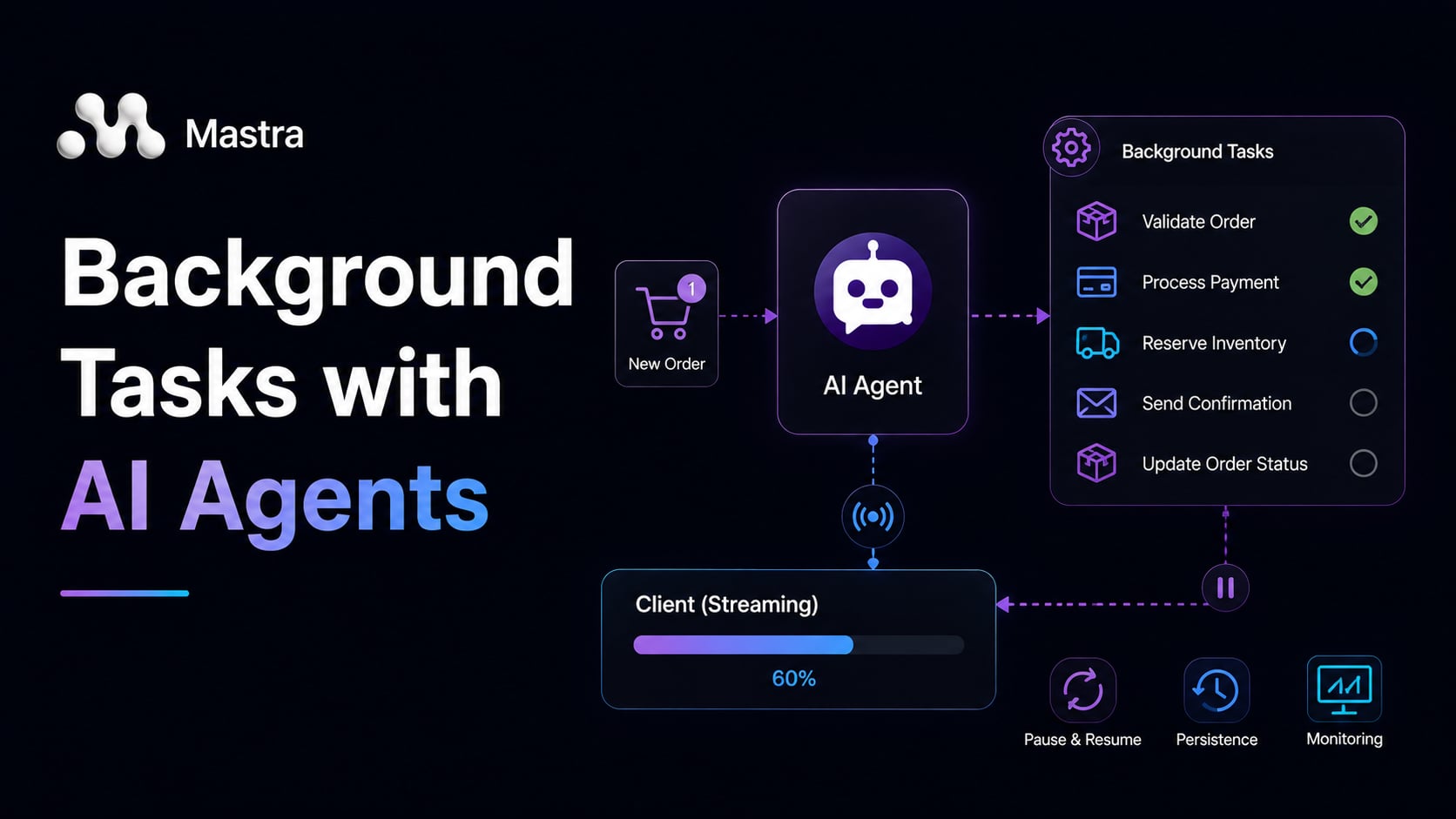
An e-commerce agent places an order. To do that properly, it needs to check inventory, verify the payment, run a fraud score, and schedule a shipment. Each of those is a real API call to a real external service. Some take two seconds. Some take five. If the agent waits for each one before calling the next, the customer is sitting in front of a loading spinner for twelve, sometimes fifteen seconds.
Before frameworks like Mastra had a clean answer for this, developers tried two approaches. The first was fire-and-forget: kick off the external calls without waiting for them, return a quick “we’re on it” to the user, and handle results in separate background jobs wired up through queues. That works for processing pipelines, but it completely breaks the agentic loop. The agentic loop is the cycle in which the LLM generates a response, makes tool calls, receives those results back in its context, and generates the next response: each iteration depends on the results of the last. The LLM never sees the results. It cannot synthesize them, reason about them, or react if one of them fails. You have handed the work off to a system the agent cannot talk to.
The second approach was client-side polling: the agent starts the slow calls, the client polls a status endpoint every few seconds, and once everything is done the client sends a follow-up message to the agent with all the results pasted in. This keeps the agent informed, but it puts enormous coordination logic on the client, adds latency from polling intervals, and means the agent’s memory has a gap: it never experienced the work happening, it just received a summary of it after the fact.
Both of these patterns treat the slow tools as something that happens outside the agent. Mastra’s background task system takes a different view: the slow tools still belong to the agent, they just run concurrently instead of sequentially. The results flow back into agent memory automatically, and the agent re-enters its loop once everything is ready. Nothing leaks out to external queues or client-driven polling. The agentic loop stays coherent.
In this article, we are going to understand how that system works from the inside out. We will use an order processing agent as our running example throughout, because the scenario is universal: any engineer who has ever optimized a checkout flow has faced exactly this problem.
We are not going to build a full production project here. Instead, we will focus on the concepts you need to understand first: how background tasks are handled internally, how to configure Mastra to enable them, the three layers of opt-in, how clients stream progress, lifecycle callbacks, suspension and resumption for human review, and the monitoring API. The official Mastra documentation is the right place for the full configuration reference.
How Background Tasks Work Internally
Before writing any configuration, it helps to understand what is actually happening under the hood. Once you see the mechanics, the configuration options become a lot less arbitrary.
The worker pool and task queue
Think of it like a restaurant kitchen. The head chef (the LLM) does not stand at the grill waiting for the steak to cook before starting the next dish. They call out the order, a line cook picks it up, and the chef moves on to the next ticket. When the steak is ready, the line cook calls it out and the chef plates everything together.
Mastra’s worker pool works the same way. When background tasks are enabled, Mastra runs a concurrency-limited worker pool alongside your agent. In Mastra’s current implementation, background tasks run as async operations on the same Node.js event loop, not in separate threads or processes. This means background execution prevents the LLM’s response turn from waiting, but it does not provide true CPU parallelism. CPU-bound work inside a tool still contends for the event loop. When a tool is called with background execution, Mastra does not block the LLM’s response loop waiting for the tool to finish. Instead, it enqueues the tool call as a background task and returns an acknowledgement immediately. The LLM can keep generating text, call other tools, or finish its response while the background worker picks up the task and executes it.
Two configuration knobs control how many tasks can run at once:
globalConcurrency: the total number of concurrent background tasks across all agents on this Mastra instance.perAgentConcurrency: a per-agent cap, so one busy agent does not starve others.
When all worker slots are occupied and a new task arrives, its fate depends on the backpressure setting. With backpressure: 'queue', the task waits in an in-memory queue until a slot frees up. Because this queue lives in process memory, tasks waiting in it are lost if the process restarts before a worker slot opens. Storage persistence covers tasks that have already been picked up and started, not tasks still in the queue. If your deployment restarts frequently, size globalConcurrency generously so tasks are picked up quickly. The default behavior is to fail immediately if no slot is available. The task transitions immediately to failed and the tool returns an error result to the LLM, rather than throwing an exception at the call site. The agent’s onTaskFailed callback fires, and the LLM sees a failed tool result it must handle in its next response.
Task lifecycle
Every background task moves through a fixed set of states:
enqueued
   |
running
   |
   +---> completed
   |
   +---> failed
   |
   +---> suspended  (waiting for external signal)
   |         |
   |      resumed
   |         |
   |      running (continued)
   |
   +---> cancelled
In the example above, each arrow is a possible state transition. Notice that suspended does not lead directly to completed. It passes through resumed → running (continued) first. This is what allows the concurrency slot to be released and reclaimed while a task waits, rather than holding it for the entire duration of a human review that could take minutes or hours.
Mastra persists each task record, its current state, and its result (once available) to your configured storage backend. This is why background tasks require a storage backend at all: If the process restarts while a task is running, Mastra reads the persisted task records on startup and re-dispatches any tasks that were in the running state, restarting them from the beginning of their execute function. There is no mid-function checkpoint. Only the task’s metadata, state, and any data passed to suspend() are persisted. Write tool execute functions to be idempotent, or check for already-completed side effects at the start.
How results flow back to the agent
So how does the agent actually see those results once the tasks finish?
This is the part that distinguishes Mastra’s system from a plain background job queue. When a background task completes, its result is injected into the agent’s message history as if the tool had returned synchronously. The agent is then re-invoked automatically to process all the accumulated results in one shot. Re-invocation happens once, triggered by untilIdle when no tasks are left in the running state (or maxIdleMs elapses). If some tasks completed and others failed, both the successful results and the error records are injected together. The LLM receives a complete picture of which tools succeeded and which did not.
From the LLM’s perspective, the tool results simply arrived. It does not know or care whether they ran in the background. It reads them, reasons over them, and produces a final response. The agentic loop closes cleanly.
💡 This automatic result injection is only possible when you use
untilIdle: trueon the agent stream. We will cover that in the streaming section.
Setting Up Mastra for Background Tasks
Background tasks require two things: a storage backend and an explicit opt-in on the Mastra instance.
Mastra ships several storage adapters. LibSQLStore uses LibSQL, an embedded SQLite-compatible database. The file:./mastra.db fallback writes to the process’s working directory, which is convenient for local development but will be discarded on restart in a container or serverless environment with no persistent volume. For production, set DATABASE_URL to a persistent path or a remote LibSQL server.
// file: src/mastra.ts
import { Mastra } from "@mastra/core";
import { LibSQLStore } from "@mastra/libsql";
import { orderAgent } from "./agents/order-agent.js";

export const mastra = new Mastra({
  agents: { orderAgent },
  storage: new LibSQLStore({
    url: process.env.DATABASE_URL ?? "file:./mastra.db",
  }),
  backgroundTasks: {
    enabled: true,
    globalConcurrency: 10,
    perAgentConcurrency: 4,
    backpressure: "queue",
  },
});
In the example above, storage is where Mastra persists every task-state transition: each time a task moves from enqueued to running, or from running to completed (or failed, or suspended), Mastra writes a record containing the new state, the task’s metadata, and any result or suspension payload to the configured database table. At process startup, Mastra queries that table and re-dispatches any tasks still recorded as running, restarting their execute function from the top. Without a storage backend there is nowhere to write those records, which is why Mastra refuses to start when backgroundTasks.enabled is true but no storage is configured.
The backgroundTasks block enables the worker pool and sets concurrency limits. globalConcurrency: 10 means at most ten background tasks run at any moment across all agents. perAgentConcurrency: 4 means the order agent specifically will not run more than four at once, even if global slots are available. backpressure: "queue" governs what happens to a task that arrives when every worker slot is occupied: Mastra places it in an in-memory list and holds it until a slot frees up. Without this setting, a task that finds no free slot transitions directly to failed and the LLM receives an error result for that tool call. That queue is not written to storage, so tasks waiting in it are discarded if the process restarts before they are picked up.
💡 If you set
backgroundTasks.enabled: truewithout configuring a storage backend, Mastra throws at startup. There is nowhere to persist task state, so the system refuses to start rather than silently losing results.
Defining the Tools
Let’s define the four tools our order agent will use. For now, we will define them as normal blocking tools. We will add background configuration in the next section.
Each tool uses createTool with a Zod inputSchema, a outputSchema, and an execute function that simulates a slow external call.
// file: src/tools/order-tools.ts
import { createTool } from "@mastra/core/tools";
import { z } from "zod";

export const checkInventory = createTool({
  id: "check_inventory",
  description:
    "Check whether the ordered items are available in the warehouse.",
  inputSchema: z.object({
    orderId: z.string(),
    items: z.array(z.object({ sku: z.string(), quantity: z.number() })),
  }),
  outputSchema: z.object({
    available: z.boolean(),
    shortages: z.array(z.string()),
  }),
  execute: async ({ context }) => {
    // Simulate a slow warehouse API call
    await new Promise((resolve) => setTimeout(resolve, 3000));
    return { available: true, shortages: [] };
  },
});
In the example above, items is an array so the agent can check multiple SKUs in a single call rather than looping over them one by one. The outputSchema is just as important as the inputSchema here: Mastra validates the return value against it before injecting the result into agent memory, so a malformed response from the warehouse API surfaces as an error during execution rather than corrupting the LLM’s context. The setTimeout simulates a slow cross-region warehouse call. The other three tools (verifyPayment, detectFraud, scheduleShipment) follow the same pattern, each with their own input/output schemas and simulated delays.
Opting In to Background Execution
Mastra gives you three layers of control over which tools run in the background and which run synchronously. Understanding all three (and how they interact) saves a lot of confusion when you start mixing tools from shared libraries with agents that have different performance requirements.
Tool-level opt-in
The simplest way to background a tool is to declare it inside the tool definition itself. Add a background field with enabled: true:
export const checkInventory = createTool({
  id: "check_inventory",
  description:
    "Check whether the ordered items are available in the warehouse.",
  inputSchema: z.object({
    orderId: z.string(),
    items: z.array(z.object({ sku: z.string(), quantity: z.number() })),
  }),
  outputSchema: z.object({
    available: z.boolean(),
    shortages: z.array(z.string()),
  }),
  background: {
    enabled: true,
    timeoutMs: 15_000,
    maxRetries: 2,
  },
  execute: async ({ context }) => {
    await new Promise((resolve) => setTimeout(resolve, 3000));
    return { available: true, shortages: [] };
  },
});
In the example above, background.enabled: true tells Mastra this tool should always run as a background task, regardless of which agent calls it. timeoutMs: 15_000 caps each execution at fifteen seconds before Mastra marks the task as failed. Mastra changes the task’s state to failed and stops waiting for the result, but it cannot forcibly abort the underlying async execution. If your tool is awaiting a slow HTTP response, that request continues after the timeout fires. For tools that must not run beyond their window, pass an AbortSignal through your tool’s context and honour it inside execute to cancel in-flight requests explicitly. maxRetries: 2 lets failed tasks retry twice before giving up. Retries fire immediately with no backoff. If your tool has already produced a side effect before failing (a payment authorized but a timeout prevented the response from returning), retrying blindly can duplicate that effect. For tools like verifyPayment where a duplicate call is worse than a clean failure, set maxRetries: 0 and handle failures in the agent’s synthesis instead.
The advantage of tool-level opt-in is consistency: any agent that uses this tool gets the same behavior. The risk is the same thing in reverse. If you share this tool across multiple agents and one of them needs it to run synchronously (because it is building a real-time preview, say), tool-level config offers no escape hatch. That is where agent-level config comes in.
Agent-level configuration
The agent definition accepts a backgroundTasks.tools block that lets you override per-tool settings for this specific agent:
// file: src/agents/order-agent.ts
import { Agent } from "@mastra/core/agent";
import { provider } from "../ai-provider.js";
import {
  checkInventory,
  verifyPayment,
  detectFraud,
  scheduleShipment,
} from "../tools/order-tools.js";

export const orderAgent = new Agent({
  id: "order_agent",
  name: "Order Agent",
  instructions: `You are an AI-powered order processing assistant.
When a customer places an order, run all four checks in parallel:
check inventory, verify payment, detect fraud, and schedule shipment.
Once all results are available, summarize the outcome for the customer.
If the fraud score is high, do not confirm the order until a human reviewer approves.`,
  model: provider(),
  tools: { checkInventory, verifyPayment, detectFraud, scheduleShipment },
  backgroundTasks: {
    tools: {
      check_inventory: { enabled: true, timeoutMs: 10_000 },
      verify_payment: { enabled: true, timeoutMs: 20_000 },
      detect_fraud: { enabled: true, timeoutMs: 30_000 },
      schedule_shipment: { enabled: true, timeoutMs: 15_000 },
    },
  },
});
In the example above, each tool is keyed by its id string (not the variable name). The agent-level config takes priority over whatever the tool defines in its own background field. This means if checkInventory declared timeoutMs: 15_000 at the tool level, this agent would override it to 10_000. A different agent using the same tool could leave the default or override it to something else entirely.
LLM override via _background
The third layer is the most dynamic: the model itself can decide at call time whether a specific invocation should run in the background. When the LLM includes a _background: true or _background: false field in its tool call arguments, Mastra uses that as a per-call override.
You do not write any extra code to enable this. Mastra injects the _background field into the tool’s input schema automatically when background tasks are active. The model can then reason about whether a particular invocation is time-sensitive and choose accordingly.
The full priority resolution, from highest to lowest, is:
agent-level config
   > tool-level config
      > LLM _background override
         > manager defaults
In the example above, the priority ordering shows that higher layers win unconditionally: if an agent-level config sets enabled: true for a tool, tool-level config and the LLM override cannot change it. The LLM override only takes effect when neither agent-level nor tool-level config has set enabled explicitly. If a tool declares background.enabled: true and no agent-level config overrides it, the LLM’s _background: false is silently ignored. In practice, the LLM override is most useful for tools that have no background block of their own.
💡 The LLM override is useful when the same tool is called in different contexts within a single conversation. For example, a quick availability check before showing a product page might benefit from running synchronously, while the same inventory check during checkout can safely run in the background.
Streaming to the Client
With tools configured for background execution, the next question is: how do clients receive updates as tasks progress? Mastra gives you two options, and they serve different purposes.
Keeping the agent stream open with untilIdle
The primary pattern is to use agent.stream() with untilIdle: true on your server endpoint:
In Mastra’s memory model, a thread is a conversation session: a sequence of messages between one user and one agent. A resource is the entity the conversation is about, such as an order ID or a user account. Multiple threads can reference the same resource. The resourceId is also what the monitoring API’s filter uses to scope task event streams to a specific order.
// file: src/server.ts
import express from "express";
import { mastra } from "./mastra.js";

const app = express();
app.use(express.json());

app.post("/orders", async (req, res) => {
  const { message, threadId, resourceId } = req.body;

  res.setHeader("Content-Type", "text/event-stream");
  res.setHeader("Cache-Control", "no-cache");
  res.setHeader("Connection", "keep-alive");

  const stream = await mastra.getAgent("order_agent").stream(message, {
    memory: { thread: threadId, resource: resourceId },
    untilIdle: { maxIdleMs: 60_000 },
  });

  for await (const chunk of stream) {
    res.write(`data: ${JSON.stringify(chunk)}\n\n`);
  }

  res.end();
});
In the example above, memory.thread and memory.resource anchor this agent run to an existing conversation and domain entity. The thread ID causes Mastra to load the previous message history for that thread, append the new tool results to it, and write the updated history back to storage when the agent finishes, so the re-invocation triggered by untilIdle sees all prior turns, not just the current one. The resource ID binds every task spawned during this run to the order ID, which is what lets manager.stream({ resourceId: orderId }) filter the monitoring event stream to a single order’s tasks without scanning the full task table. untilIdle does two things beyond that. First, it keeps the SSE connection open even after the LLM finishes its initial response, so background tasks have a channel to send progress over. Second, once all background tasks reach a terminal state (completed, failed, or suspended), it re-invokes the agent automatically with all the accumulated results injected into memory. The LLM wakes up, reads what all four tools returned, and produces the final order confirmation. Only then does the stream close.
maxIdleMs: 60_000 is the maximum time to wait with no activity before giving up. Without it, a suspended task waiting for a human reviewer could hold the connection open indefinitely. When maxIdleMs fires while tasks are still running, the SSE connection closes but those tasks continue executing. Their results are persisted when they eventually complete. A subsequent call to manager.getTask() or a new stream subscription can retrieve them. Design your client to treat a closed stream as ‘results may still be arriving’ rather than ‘order processing failed’.
What the client receives
From the client’s perspective, the stream delivers two kinds of chunks interleaved: normal text chunks from the LLM’s response and structured event chunks from the background task system. Here is what the sequence looks like for our order flow:
[text]  "Got it! I'm processing your order now..."

[background-task-started]  { taskId: "t1", toolId: "check_inventory" }
[background-task-started]  { taskId: "t2", toolId: "verify_payment" }
[background-task-started]  { taskId: "t3", toolId: "detect_fraud" }
[background-task-started]  { taskId: "t4", toolId: "schedule_shipment" }

[background-task-progress] { taskId: "t1", status: "running" }
[background-task-progress] { taskId: "t2", status: "running" }

[background-task-progress] { taskId: "t4", status: "completed", result: {...} }
[background-task-progress] { taskId: "t1", status: "completed", result: {...} }
[background-task-progress] { taskId: "t2", status: "completed", result: {...} }
[background-task-progress] { taskId: "t3", status: "suspended", data: { riskScore: 0.91 } }

... (agent re-invoked internally once idle threshold is reached) ...

[text]  "Inventory confirmed. Payment verified. Shipment scheduled."
[text]  "The fraud check flagged a high risk score and is waiting for review."
[text]  "I'll confirm the order as soon as a reviewer approves."
In the example above, all four background-task-started events fire in the same LLM turn, which confirms the agent called all four tools in one step rather than sequentially. Tasks then complete out of order: schedule_shipment finished before check_inventory because the shipment API happened to respond faster. t3 (detect_fraud) reaches suspended rather than completed, which means when the agent is re-invoked by untilIdle, it receives suspension data for that tool, not a result. The LLM must account for the missing approval in its final message. Mastra does not impose any ordering on completion events. The agent receives all results regardless of order, and it is the LLM’s job to reason about them together.
💡 For building a separate order-status dashboard,
backgroundTaskManager.stream()with aresourceIdfilter gives you a dedicated event stream without coupling it to the agent’s SSE connection. We will cover the monitoring API in a later section.
Lifecycle Callbacks
But what if you need to react to a task the moment it finishes, before the agent synthesizes anything?
Sometimes you want to react to a task completing or failing without waiting for the agent to synthesize the results. The task.metadata field holds arbitrary data you attach when the task is created, typically through the tool’s call-time arguments or the agent’s per-tool config. For the order agent, including { orderId: context.orderId } in the metadata lets callbacks identify which order a task belongs to without parsing the full input. Lifecycle callbacks let you register handlers that fire at terminal state, independently of the stream.
// file: src/agents/order-agent.ts
export const orderAgent = new Agent({
  id: "order_agent",
  name: "Order Agent",
  instructions: `...`,
  model: provider(),
  tools: { checkInventory, verifyPayment, detectFraud, scheduleShipment },
  backgroundTasks: {
    tools: {
      verify_payment: { enabled: true, timeoutMs: 20_000 },
      // ... other tools
    },
    onTaskComplete: async (task) => {
      console.log(
        `[${task.toolId}] completed for order ${task.metadata?.orderId}`,
      );
      await observability.track("background_task_completed", {
        toolId: task.toolId,
        durationMs: task.durationMs,
      });
    },
    onTaskFailed: async (task, error) => {
      console.error(`[${task.toolId}] failed:`, error.message);
      await alerting.notify("on-call", {
        message: `Background task ${task.toolId} failed for order ${task.metadata?.orderId}`,
      });
    },
  },
});
In the example above, onTaskComplete fires every time any background task on this agent reaches the completed state. onTaskFailed fires when a task exhausts its retries and is marked failed. Both handlers receive the full task record, including the toolId, the result or error, and any metadata you attached when configuring the task. If a callback throws, Mastra catches the error and logs it. The task’s terminal state is not affected. A broken callback will not crash the worker pool, but it will silently skip whatever side effect it was supposed to produce. Wrap callback logic in its own try-catch and emit errors to your observability layer directly.
Callbacks can also be registered at the tool level (inside the background config on the tool definition) or at the manager level (on the backgroundTasks block of the Mastra instance), if you want coarser or finer granularity.
💡 Callbacks fire at terminal state only. If you need to react to a task transitioning from
enqueuedtorunning, use the manager stream. Callbacks are for “this is done” reactions like logging, alerting, or triggering downstream jobs.
Suspension and Resumption
What happens when a tool’s result is neither a clear success nor a clean failure?
The fraud detection tool presents exactly that scenario: the check returned a result (a high risk score), but the right next step is not to cancel the order or continue automatically. It is to pause and wait for a human reviewer to make the call.
Think of it like a loan officer who sets a file aside when an unusual transaction comes in. They do not reject it outright, and they do not approve it without review. They move it to a pending tray, free up their desk for other files, and pick it back up once the compliance team weighs in.
Mastra’s suspension mechanism works the same way. A tool can call suspend(data) to pause its own execution, release its concurrency slot back to the pool, and wait for an external signal before continuing.
Here is how the detectFraud tool looks with suspension added:
// file: src/tools/order-tools.ts
import { createTool } from "@mastra/core/tools";
import { z } from "zod";

export const detectFraud = createTool({
  id: "detect_fraud",
  description:
    "Run fraud detection on the order and suspend for human review if risk is high.",
  inputSchema: z.object({
    orderId: z.string(),
    customerId: z.string(),
    amount: z.number(),
  }),
  outputSchema: z.object({
    approved: z.boolean(),
    riskScore: z.number(),
    reviewNote: z.string().optional(),
  }),
  background: {
    enabled: true,
    timeoutMs: 30_000,
    suspendSchema: z.object({ riskScore: z.number(), reason: z.string() }),
    resumeSchema: z.object({ approved: z.boolean(), reviewNote: z.string() }),
  },
  execute: async ({ context, suspend, resumeData }) => {
    // If we are re-entering after a resume, use the reviewer's decision
    if (resumeData) {
      return {
        approved: resumeData.approved,
        riskScore: context.riskScore ?? 0,
        reviewNote: resumeData.reviewNote,
      };
    }

    // Simulate fraud scoring
    await new Promise((resolve) => setTimeout(resolve, 4000));
    const riskScore = Math.random();

    if (riskScore > 0.8) {
      // High risk: pause and wait for a human reviewer
      await suspend({ riskScore, reason: "Score exceeds threshold" });
      // Execution halts here until manager.resume() is called
    }

    return { approved: true, riskScore, reviewNote: undefined };
  },
});
In the example above, suspend({ riskScore, reason }) does three things: it persists the tool’s current state to storage, it moves the task to the suspended state, and it releases the concurrency slot so other tasks are not blocked waiting. The suspendSchema and resumeSchema in the background config type the data flowing in and out of the suspension point. Both schemas are enforced at runtime. Calling suspend() with data that does not match suspendSchema throws before the suspension is persisted. Calling manager.resume() with non-conforming data throws at the call site before the task is re-queued. Schema mismatches surface at the boundary rather than inside the tool.
When the tool is eventually resumed, execution re-enters execute from the top, but resumeData is now populated with whatever was passed to manager.resume(). The if (resumeData) check at the top catches this re-entry and returns the reviewer’s decision directly. Because re-entry starts execute from the first line, all local variables computed during the first run are gone. Any value your post-resume logic needs must either be passed into the suspend() payload so it is persisted, or re-derived from context. The context object holds the original tool call arguments exactly as the LLM provided them.
The /orders/review endpoint triggers the resume:
// file: src/server.ts
app.post("/orders/review", async (req, res) => {
  const { taskId, approved, reviewNote } = req.body;

  const manager = mastra.getBackgroundTaskManager();
  await manager.resume(taskId, { approved, reviewNote });

  res.json({ status: "resumed" });
});
In the example above, taskId comes from whatever surface surfaced the suspended task to the reviewer (a dashboard, a Slack notification, an email link). Calling manager.resume() with the wrong taskId is a no-op for the target task, not a thrown error, so you should verify the task exists and is in suspended state via getTask() before calling resume.
When manager.resume() is called, the task transitions back to running, re-enters execute with the reviewer’s data, completes normally, and its result is injected into agent memory. If the agent’s untilIdle stream is still open, the result flows through it. If the stream had already closed (the reviewer took longer than maxIdleMs), the result is still persisted, and the agent can pick it up the next time the thread is accessed.
💡 Suspension releases the concurrency slot while the task waits. This means a suspended task does not block other orders from processing. You could have a hundred orders in flight, each waiting for fraud review, without exhausting the worker pool.
Monitoring Background Tasks
What does this look like from an ops team’s perspective?
For operations teams (and for building order-status UIs), Mastra exposes a monitoring API separate from the agent stream.
Subscribing to all task events
backgroundTaskManager.stream() returns a live event stream that you can subscribe to with optional filters:
// file: src/server.ts
app.get("/orders/:orderId/events", async (req, res) => {
  const { orderId } = req.params;

  res.setHeader("Content-Type", "text/event-stream");
  res.setHeader("Cache-Control", "no-cache");

  const manager = mastra.getBackgroundTaskManager();
  const controller = new AbortController();
  req.on("close", () => controller.abort());

  const stream = manager.stream({
    resourceId: orderId,
    signal: controller.signal,
  });

  // The stream emits a snapshot of running tasks immediately on connection,
  // then forwards live events as tasks transition
  for await (const event of stream) {
    res.write(`data: ${JSON.stringify(event)}\n\n`);
  }

  res.end();
});
In the example above, the stream is filtered by resourceId (the order ID), so the client only receives events for tasks related to their order. On connection, Mastra emits a snapshot of all tasks in non-terminal states (enqueued, running, suspended) for that resource, so a reconnecting client can rebuild its in-progress view. Tasks already in terminal states (completed, failed, cancelled) are not included in the snapshot. If you need a combined view of live updates and historical results, fetch listTasks({ resourceId }) once on load and then subscribe to manager.stream() for subsequent events. After that, live transition events flow through: running, output, completed, failed, suspended, resumed, and cancelled.
On the client, consume the stream with the browser’s EventSource API or a fetch-based reader. If the connection drops while tasks are still running, the tasks continue executing and their results are persisted. On reconnect, the snapshot emitted on connection gives you the current state of non-terminal tasks. Do not rely on receiving every intermediate progress event; treat the snapshot as the authoritative current state.
Querying individual tasks
For a REST-style status check (polling, health dashboards, support lookups), you can query tasks directly:
// Get the current state of a specific task
const task = await manager.getTask(taskId);
console.log(task.status, task.result);

// List all tasks for a given order
const tasks = await manager.listTasks({ resourceId: orderId });
tasks.forEach((t) => console.log(t.toolId, t.status));
In the example above, getTask() is a point-in-time read. It does not subscribe to future changes, which makes it the right choice for a REST polling endpoint or a support lookup tool, but not for a real-time status dashboard (use manager.stream() for that). It returns the full task record: its current state, the result if completed, the error if failed, and the suspension data if suspended. listTasks() accepts the same filter shapes as manager.stream() and returns all matching tasks as an array.
Subagent Delegation
If your order processing logic grows complex enough to warrant a supervisor agent (one agent that orchestrates others), Mastra lets you delegate entire subagent calls to the background task system. A supervisor can hand off a fraud review subagent as a background task, with its own timeout and concurrency configuration:
export const supervisorAgent = new Agent({
  id: "supervisor",
  name: "Order Supervisor",
  instructions: `...`,
  model: provider(),
  tools: { ... },
  backgroundTasks: {
    agents: {
      fraud_review_agent: { enabled: true, timeoutMs: 120_000 },
    },
  },
});
In the example above, fraud_review_agent is keyed by the subagent’s id string, which mirrors the same convention as the tool-level backgroundTasks.tools block. The timeoutMs: 120_000 is two minutes, considerably longer than a typical tool timeout, because a subagent may itself call multiple background tools before completing.
The subagent runs as a single background task from the supervisor’s perspective, holding one task slot for its full execution including all its own tool calls. The subagent’s tools run under the subagent’s own worker pool config, not the supervisor’s. The timeoutMs: 120_000 is a wall-clock cap on the entire subagent call. If the subagent’s tools can take longer than 120 seconds in total, the supervisor will time out and mark the delegation as failed before the subagent finishes. Size the supervisor timeout to cover the subagent’s maximum execution path plus buffer.
💡 Subagent delegation is covered in detail in the Mastra documentation on supervisor patterns. The mechanics are the same as tool-level background tasks: the call is enqueued, the supervisor continues, and the result is injected back when ready.
Wrapping Up
The order processing scenario we used here is deliberately familiar. Four slow external calls on a hot path. That is a problem every backend engineer has hit. What background tasks give you is a way to handle that pattern inside the agentic loop rather than around it.
To recap what we covered: Mastra runs a concurrency-limited worker pool that picks up background tool calls without blocking the LLM’s response. Tasks move through a well-defined lifecycle (enqueued → running → completed / failed / suspended / cancelled), persisted to storage so they survive restarts. Results are injected back into agent memory automatically. The LLM just sees completed tool calls. You control which tools run in the background through three layers of configuration, from the tool definition itself down to a per-call LLM override, with a clear priority order when they conflict. The untilIdle stream keeps the SSE connection open until everything settles, and lifecycle callbacks let you react to terminal states for logging and alerting. Suspension gives tools a way to pause mid-execution for human review without blocking the worker pool, and the monitoring API gives ops teams full visibility without coupling to the agent stream.
One thing worth flagging: background tasks add overhead. There is queuing, serialization to storage, and worker pool coordination happening on every task. For fast, synchronous tools (a simple lookup that returns in under 100ms), that overhead will cost more than it saves. Background tasks are the right choice when your tools are genuinely slow, call external services, or need human-in-the-loop checkpoints. For everything else, the standard synchronous loop is simpler and faster.